Uninstall VS Code on Mac Without Losing Settings

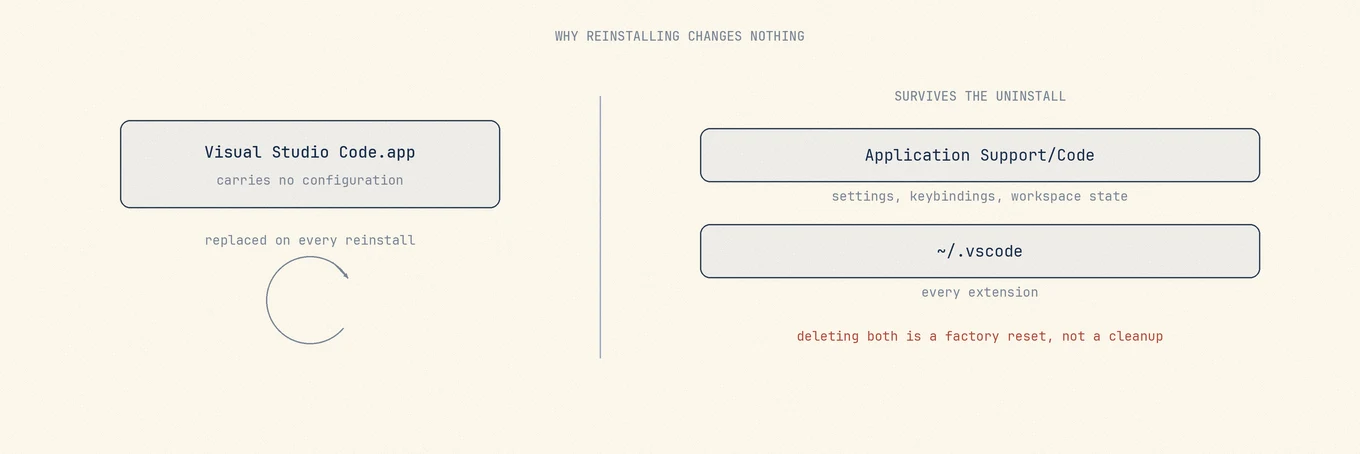
Dragging Visual Studio Code to the Trash removes the editor and none of your setup. That is deliberate, documented, and the reason most people find VS Code exactly as they left it after a reinstall they hoped would fix something.
If you are uninstalling to start clean, the app is the part that does not matter.
So decide what you want the next install to remember. Moving Visual Studio Code to the Trash keeps the setup. Removing its user-state locations starts over, which is useful only after you have checked Settings Sync and saved anything you cannot recreate.
Your setup lives outside the app
VS Code's clean-uninstall guide keeps the app removal and user-state removal separate. On macOS, the state lives outside the application bundle:
~/Library/Application Support/Code
~/.vscode-shared
~/.vscode
The first holds settings, keybindings, workspace state, and data written by extensions.
The last holds the extensions themselves. The current guide also lists .vscode-shared;
it may not exist on every Mac, but it belongs in a complete reset when present.
The documentation is explicit about what removing them does: it returns you to the state before you installed VS Code, and resets all settings. That is the correct description of a factory reset, and the wrong outcome if you were only trying to fix a stuck window.
Decide which outcome you want first
Three different jobs get called uninstalling, and they need different amounts of deleting.
Reinstall to fix a broken build: remove the app only. Everything comes back. If the problem was in your settings or an extension, this achieves nothing, which is the usual outcome.
Start from a clean editor: remove the app and the listed state locations. Export your settings first if you want any of them back.
Free space: remove neither. The space is almost always in per-project caches rather than in the editor, and there is a separate article for that.
Sync makes the decision for you
If Settings Sync is on and signed into a GitHub or Microsoft account, your settings, keybindings, snippets, and extension list are stored in that account. This lowers the risk of a reset, but it does not back up every local file an extension writes.
If Settings Sync is off, these state locations may hold the only record. A settings.json
tuned over two years is a file you wrote, not a cache, and nothing else has a copy.
Check before deleting. It is in the account menu at the bottom of the activity bar, and it takes longer to read this sentence than to look.
Export the extension list even if you delete everything
code --list-extensions > ~/Desktop/vscode-extensions.txt
This works while VS Code is still installed and turns rebuilding into a loop rather than
an act of memory. If the code command is not on your path, VS Code installs it from the
command palette under Shell Command.
The command line tool and the leftovers
Removing the app leaves the code shell command pointing into a bundle that no longer
exists, along with the usual caches, logs, and saved application state. Those are
disposable in every case.
Per-project artifacts are not part of this at all. A .vscode folder inside a repository
belongs to that project and travels with it in version control; removing the editor
should not touch it.
Seeing the size before deciding
These state locations grow quietly. Extension hosts cache language servers, and a few extensions keep indexes that reach into the gigabytes, which is usually the real answer to why the editor's footprint is larger than the editor.
Mole shows the related state locations with their sizes alongside the app, so the difference between an extension cache worth clearing and a settings directory worth keeping is visible before anything moves. Removals land in the Trash, which is the right place for a directory you might discover you wanted an hour later.
What Settings Sync carries, and what it does not
It carries settings, keyboard shortcuts, user snippets, the extension list, and some UI state. Sign into the same account on another machine and those return on their own.
It does not carry workspace-level state, or the data extensions write to disk. A
.vscode/settings.json inside a repository travels with that repository and is
none of its business, and extension indexes, language server caches and sign-in
state do not follow either, so a reinstalled extension may still need setting up
again.
The account menu at the bottom of the activity bar shows the current state. If it says you are signed in and shows a sync time, the synced subset can be restored after a reset. Local extension data still needs its own backup; without Sync, inspect every state location as though it were the only copy.
What Mole lists for this app, and what it leaves alone, is in Uninstall VS Code on Mac.