Fewer Settings, Clearer Choices
I have been revisiting Mole’s settings. The panel felt crowded, English descriptions ended in ellipses, and the permissions area had two Settings buttons and two Check buttons. The features were there, but reading the page took work. Some rows needed clearer words; others did not need an option at all. This records changes in development for the next version.
Stop asking when the default is enough
Skipping intro screens was already the default. Turning it off mostly added another planet and poem, so I removed the switch. Clean and Optimize retain their landing pages, and Analyze still has its planet before a scan. Temperature stays in Celsius: a US user had previously read a Fahrenheit chip temperature as overheating. That choice no longer needs a row either.
Hide Dock Icon and keeping Mole in the menu bar after Cmd+Q had lived in different places. They now sit together. Permission rows keep Open System Settings; Mole checks again when the user returns, so a separate Check button is unnecessary. Shortcut clearing and restoring also share one position in the shortcut menu.
The final pass also moved launch at login to Menu Bar, alongside the Dock icon and what happens after quitting. General keeps permissions, language, cleanup and the license; beta updates come after the license. Keeping related choices together saves more effort than adding another explanation to each one.
Explain what each choice controls
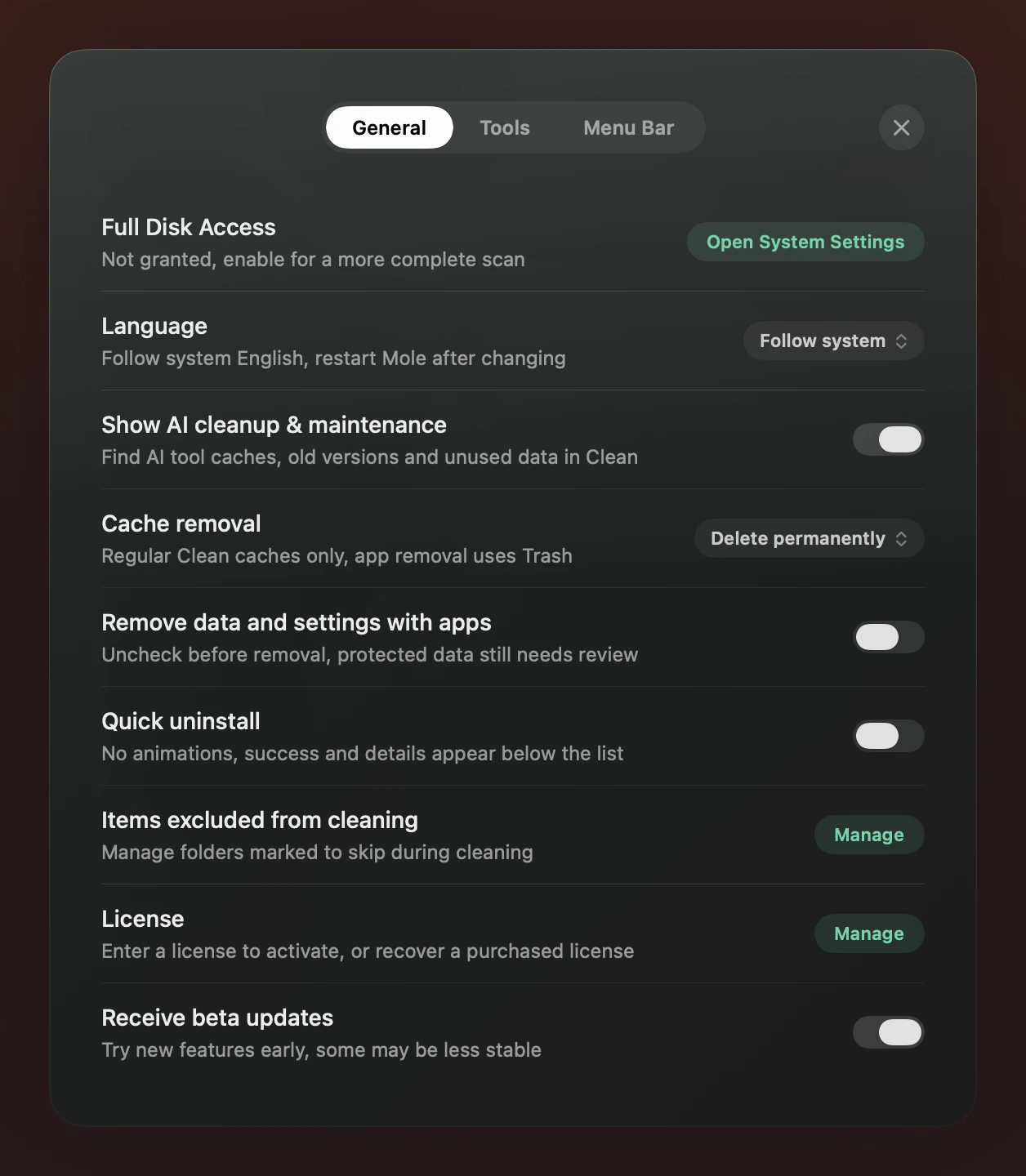
Cache removal sounded like a rule for every deletion in the app. Its explanation now names ordinary caches on Clean. Permanent deletion releases that space directly; moving to Trash releases it after Trash is emptied. This choice does not control uninstalling apps and their related data. Removing a protected item only removes its exclusion, not the folder.
Operational text now uses the system font. Paths, logs and keys stay monospaced; metrics and planet titles keep their own treatment. The three tabs carry the Settings header without another visible title. Each row aims to use one switch, dropdown or button rather than a mixture of competing controls.
Dropdowns needed several passes too. Green values looked like buttons waiting to be pressed, so the selected value is now neutral gray while actions that open a page or manage something stay green. Body text, tabs and controls each have a consistent weight. That makes a current state easier to distinguish from an action.
Keep consecutive uninstalls on the list
A user removing several apps had to visit a result page and return after each one. Faster animation would not remove that step. An optional Quick Uninstall switch, off by default, keeps scanning and removal on the existing list. Progress stays in the footer; success names the apps, reports freed space and remains for ten seconds.
The footer can still open this run’s path details. The timer pauses while they are open and starts a fresh ten seconds on closing. Failed or partial runs retain the existing result and details. The option removes page changes, not scanning, quit consent or checks before deletion.
Choosing the removal options
These options govern different parts of removal. Choose according to what you want to keep rather than enabling all of them to clean more.
| Option | What changes | How to choose |
|---|---|---|
| Cache removal | Where regular Clean caches go | Choose Trash for time to reconsider; use permanent deletion when you have confirmed the caches can be rebuilt |
| Remove data and settings with apps | Preselects app data eligible for bulk selection | Leave off to keep configuration; when on, items can still be unchecked, and shared or protected data needs separate review |
| Quick uninstall | Where a successful result appears | Enable for consecutive uninstalls; leave off for the full result page. Checks before removal stay the same |
Not every switch should disappear. Whether app data should be selected with an uninstall is a real preference, so that option remains off by default. Shared and protected data still require separate review. As in the Clean and Analyze changes, the choices left on the page need to explain what the user is choosing.