Mole CLI vs Mac App: Free Terminal or Paid GUI
Mole ships as two programs. mo is a free, open-source command line tool installed
with Homebrew and licensed under GPL-3.0. Mole for Mac is a paid native app with five
tabs and a menu bar presence. They are not a trial and a pro edition. They are separate
implementations with overlapping jobs and a small shared layer on disk, so choosing one
does not lock you out of the other. This is a guide to picking the one that matches how
you already work, and to what happens if you keep both.
Quick comparison
Mole CLI (mo) |
Mole for Mac | |
|---|---|---|
| License | Free, open source, GPL-3.0 (not MIT) | Paid proprietary app |
| Price | Free | $19 one-time, 2 Macs, free updates |
| Install | brew install mole |
Download from mole.fit |
| Deletion scope | Broader (assumes you read the list) | Narrower (same-or-safer than CLI) |
| Terminal-only | mo purge, mo installer, mo touchid, --dry-run / --json |
- |
| App-only | - | GUI, menu bar, fan control, startup, in-app updates, Trash-first uninstall |
| Shared on disk | ~/.config/mole/whitelist*, ~/Library/Logs/mole/operations.log |
Same paths |
What the two share
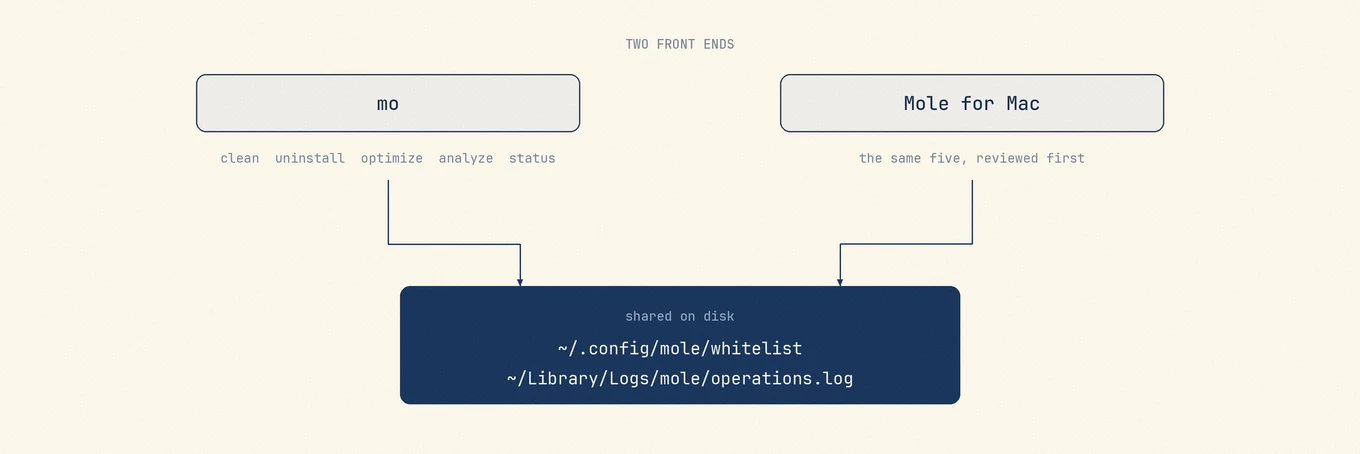
Five of the CLI's commands map directly onto the app's five tabs: mo clean,
mo uninstall, mo optimize, mo analyze, and mo status correspond to Clean,
Software, Optimize, Analyze, and Status. The categories are recognizable across both:
overlapping user, developer, browser, and system cache families, app inventory and
remnant discovery, disk analysis, and health metrics. The implementations and exact
candidate sets are not identical.
Scanning is free in both. The app charges only for the destructive half, and each destructive tool works twice before a license is required, so you can compare the app's scan against the CLI's on the same Mac without paying anything.
The more interesting overlap is on disk. Both write to ~/.config/mole/whitelist and
~/.config/mole/whitelist_optimize, and both append to
~/Library/Logs/mole/operations.log. A cache you protect in one front end is protected
in the other, and a deletion made in either leaves a record in the same file. The two
programs are not aware of each other at runtime, but they are not independent either.
What only the terminal can do
Three larger CLI workflows have no equivalent in the app. Supporting commands such as
mo history, mo update, mo completion, and mo remove are terminal administration
rather than additional maintenance surfaces.
mo purge
Scans your project directories and offers to remove heavy build artifacts. Its target
list is broad: target, build, dist, .next, DerivedData, __pycache__,
coverage, and roughly thirty more, including dependency directories that a package
manager would have to re-download. Purge deletes permanently rather than moving to
Trash, and it marks projects touched in the last seven days as recent and leaves them
unselected. It is a direct way to reclaim tens of gigabytes from a developer machine
and also the command that most deserves a --dry-run first.
mo installer
Sweeps DMG, PKG, and archive installers out of Downloads, Desktop, Homebrew caches, iCloud, and Mail, labeling each by where it came from.
mo touchid
Configures Touch ID for sudo, which is a shell configuration task rather than a
cleanup one.
The terminal also supports previews and scripts. mo clean, mo uninstall, and
mo optimize accept --dry-run, which shows the planned actions without running
them. mo analyze, mo status, and mo history accept --json, and mo status
switches to JSON on its own when its output is piped, so a health check can feed a
script. The read-only and structured-output paths also run over ssh, on a headless Mac,
or inside scripts. Scheduled deletion still needs an explicit non-interactive policy;
the interactive confirmation screen does not become safe merely because cron launched
it.
What only the app can do
The app's additions cluster around two things the terminal is bad at: continuous display and privileged system control.
For display, Analyze draws a treemap you can drill into, Status renders a live bento dashboard with sparklines and pinnable processes, and a menu bar HUD keeps CPU, memory, and network visible while you work in something else. Uninstall shows a review plan with paths, owners, and sizes before anything moves, and removals go to Trash rather than being deleted outright.
For system control, the app installs a narrowly scoped root helper through SMJobBless for fan and supported battery writes. Startup management follows a separate boundary: validated launchd jobs and supported Service Management items can be toggled, while unmatched background items open System Settings instead of being guessed at. The app also carries surfaces that only make sense as a resident app: Privacy Check, which reports live camera and microphone use, Battery Care, which holds the charge near 75 to 80 percent on supported Macs, Keep Screen On, Clean Screen for wiping the keyboard, and a read-only Doctor that assembles a diagnostic report you can paste into an issue.
The largest app-only surface is updating other apps. It detects several update channels and has in-app paths for Sparkle, Homebrew casks and formulae, the Mac App Store, and Electron feeds. GitHub Releases and website metadata can identify additional versions; when Mole cannot verify and replace a bundle safely, it opens the app or vendor page instead of inventing another installer. The license is a one-time purchase covering two Macs with free updates, a 14-day refund, and macOS 14 or later. Neither program sends telemetry.
Under the hood: how one safety model serves two front ends
The app is not a wrapper that shells out to mo. It is a Swift reimplementation, and
the two codebases share paths and safety decisions rather than processes. Analyze draws
on the CLI's path taxonomy and parallel-sizing lessons, but it has its own scanner,
timeouts, partial-result states, cache, and fallback behavior. A total from one front
end is therefore a useful cross-check, not a byte-for-byte parity promise.
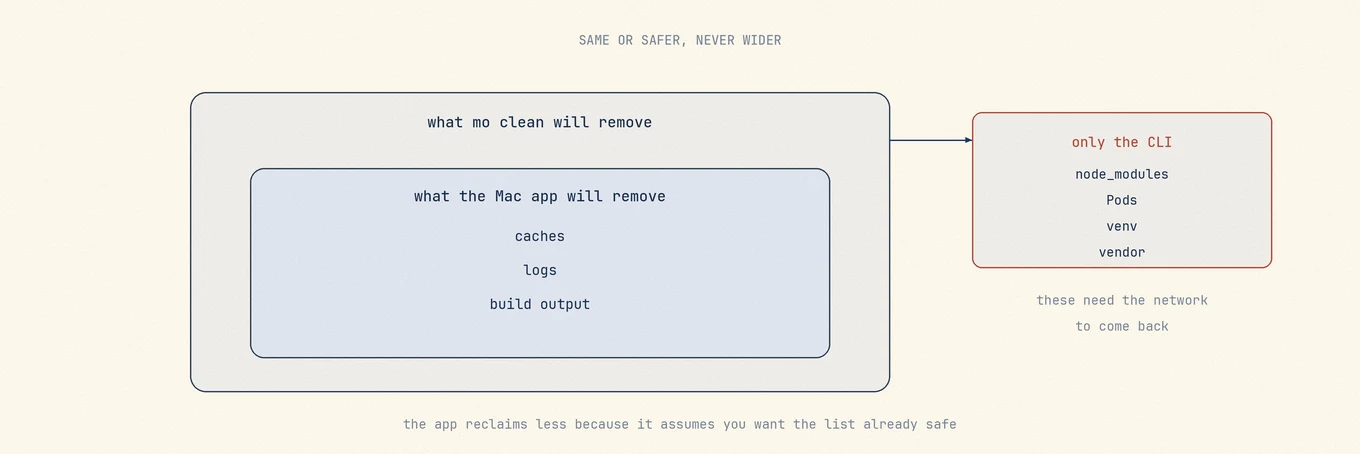
The principle recorded in the repository for keeping them in step is that CLI parity means same-or-safer, not identical deletion breadth. Every candidate the app surfaces is classified before it reaches you: selectable by default, review-only and unchecked by default, or blocked outright and refused even if something asks for it. When the CLI's behavior and that classification disagree, the app takes the narrower position.
mo purge is the clearest example. The Mac port of that sweep deliberately drops every
downloaded-dependency directory the CLI removes, including node_modules, Pods,
venv, and vendor. The reasoning is recoverability: a compiled target directory
comes back from a local build, while a dependency tree needs the network and may
resolve to something different than what was installed. The app only offers what pure
local compilation can rebuild, and it surfaces those as review-only rows rather than
preselected ones. The same asymmetry shows up elsewhere. The app gates app-data scans
behind Full Disk Access, re-validates every path at the moment of deletion rather than
at scan time, and routes app uninstall through Trash.
So the two are not equally aggressive, and the difference runs in a consistent direction. The CLI reclaims more because it assumes a user who reads the list. The app reclaims less because it assumes a user who wants the list to already be safe.
Running both
Nothing breaks if you install both, and the shared files make the combination
coherent. Protect a cache from the app's Settings and mo clean will skip it too. Add
a path with mo clean --whitelist and the app honors it. Both leave their deletions in
the same log.
Two caveats worth knowing. The programs do not coordinate while running, so do not
start a clean in both at once. And because the app is deliberately narrower, seeing a
category in mo clean that the app never offers is expected behavior, not a missing
feature.
Choosing
Install the CLI if you live in a terminal, want to preview with --dry-run, need
--json for a script, want the project artifact and installer sweeps, or simply do not
want to spend money. For a developer machine, it is often all that is needed, and it is
free precisely so that it can be.
Buy the app if you want the disk map and the live dashboard, if fan control or startup management or third-party app updates are the actual reason you are here, or if you are installing this for someone who will never open Terminal. That last case was the original reason the app exists, which is a story told in the story of Mole.
If you cannot tell yet, install the CLI first and run mo clean --dry-run. It costs
nothing, it deletes nothing, and reading its output is the fastest way to learn whether
your Mac has a problem worth a tool at all, which is a question
worth asking before installing any cleaner.