Do You Need a Mac Cleaner

Most people do not need a cleaner as routine maintenance. A cleaner can save time when the goal is specific, such as locating a large hidden cache or reviewing remnants from an uninstalled app. It cannot replace failing hardware or add RAM, and it is not a general fix for thermal or app-performance problems. Define the problem before choosing a tool category.
What macOS already does on its own
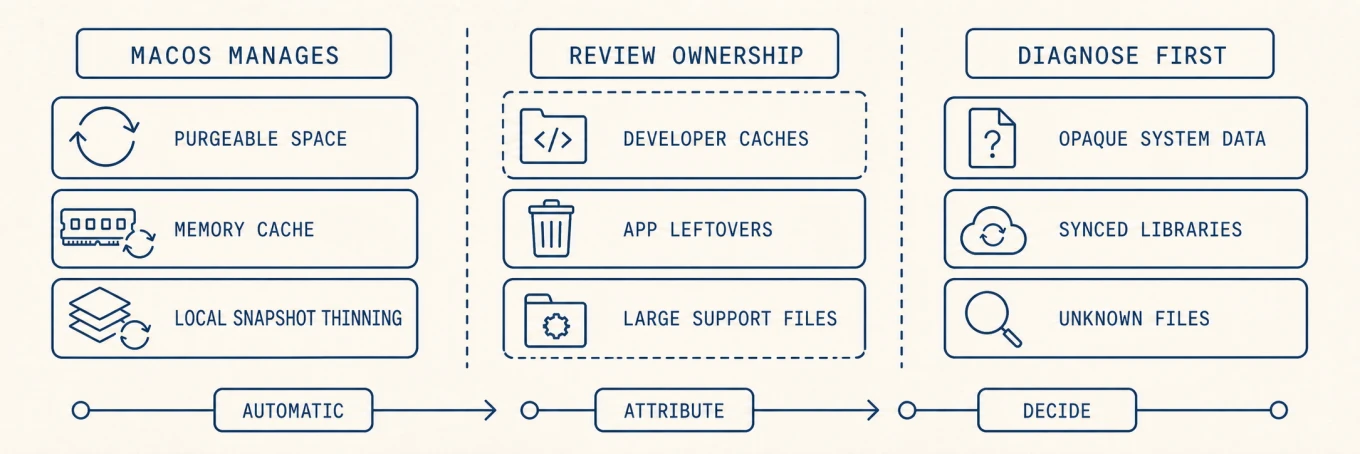
macOS reclaims several kinds of space and memory automatically, and understanding this saves you from paying for work the system already does. Available storage can include purgeable caches, and Time Machine ages or thins local snapshots automatically. The memory system repurposes cached files when apps need RAM, which is why a low "free memory" figure alone is not a reason to clean anything. These mechanisms are specific; they do not make every third-party cache or app database disposable.
What macOS does not do
Several practical gaps can remain:
- Developer and app-managed storage. Xcode output, package stores, browser data, and AI models can reach tens of gigabytes. Their owning tools understand what is reproducible better than a generic system cleanup.
- Leftovers from apps you removed. Dragging an app to the Trash leaves its support files, caches, and preferences scattered across your Library, sometimes for years. macOS does not gather or remove them.
- A clear view of where space went. Storage settings can review several user-controlled categories, but broad classifications such as System Data still do not identify the one heavy folder or its owner.
Match the tool to the job
Use a disk analyzer when the question is "where did capacity go?" Use an uninstaller when retiring an app and its vendor components. Use the package manager or app's own storage control for managed caches. Use Activity Monitor for performance. Use security software for malware. A suite may combine those surfaces, but combining them does not make every action part of one safe "clean" button.
If the Mac runs well and has comfortable available capacity, doing nothing is a valid maintenance decision. Rebuilding healthy caches on a schedule only adds I/O, network traffic, and slower first launches.
The real risk, and what to demand
Review reduces risk but does not prove a scanner classified every file correctly. Ask six questions:
- Does it show exact paths, owners, sizes, and consequences before removal?
- Does it distinguish cache, app state, user data, and shared containers?
- Does it use the owning app's cleanup interface when one exists?
- Are ordinary removals recoverable, and is there a clear skipped or failed result?
- Which operations require Full Disk Access, automation, or a privileged helper?
- How quickly are rules updated when macOS or an app changes its storage layout?
Avoid claims that one scan can safely remove every "junk" file or guarantee a speed increase. A transparent preview, narrow scope, and explicit recovery path are more important than a large reclaimed-space estimate.
Under the hood: what "automatic" actually means
macOS's self-cleaning is real but specific, and its exact shape tells you where a tool can add value and where it cannot. Free space on APFS is not one number: the file system tracks purgeable space, data it can delete on demand such as caches, evictable iCloud copies, and spare snapshots, and it reclaims that only when something needs the room. That is why deleting a large file can barely move the free-space figure until macOS thins its snapshots. Memory behaves the same way: unused RAM can hold file cache and be repurposed as pressure rises. Apple's Activity Monitor guide therefore points to memory pressure, swap, wired memory, and cached files together rather than free RAM alone.
What automatic machinery cannot always interpret is ownership and intent: a large build tree might be reproducible, while an equally large app-support folder might be a local database. That ambiguity is where a tool can help with attribution, but the user or owning app still has to decide what is disposable.
When an integrated utility is reasonable
A combined utility is reasonable when the same Mac repeatedly needs cache attribution, uninstall-remnant review, and a visual disk map. Mole is one such option: it scans and measures before presenting a deletion plan, while leaving personal libraries with their owning apps. Built-in commands can support the same decisions; integration is useful only when the saved repetition is worth another installed utility.
A decision rule
If you cannot name the problem and the data category, do not run a cleanup. If the job is specific and repetitive, choose a focused tool that shows the exact files, required permissions, effects, and recovery options. A cleaner should make file ownership clear and safe decisions easier, not suggest that macOS needs constant cleaning.
FAQ
Does macOS actually need a cleaning app?
Not for routine health. macOS purges caches under pressure, Storage Settings surfaces the large categories, and a Mac with comfortable free space and no specific symptom gains nothing from a cleanup pass. The case for a utility appears when you need visibility into where space went, or repeatable uninstalls that take leftovers with them.
Are Mac cleaner apps safe?
Apple notarization includes automated checks for known malware, not a guarantee that an app is harmless or its deletion rules are correct. Even a legitimate tool can delete something you need, so judge it by whether it previews candidates, refuses when a file changed after the scan, and logs what it removed.
Will a cleaner make my Mac faster?
Usually not. Free disk space is not throughput, and most perceived slowness comes from a specific process, thermal limits, or memory pressure rather than accumulated files. Diagnose the symptom first; if a named process is the cause, deleting caches does not address it.
Is it safe to delete everything a cleaner lists?
No, and a tool that encourages it is telling you something. Regenerable caches are fine to remove. Message histories, mail databases, application libraries, cloud mirrors, and credential stores are not caches even when a scanner groups them that way. If you cannot name what a candidate is, leave it.