Is Mole Safe for Mac? What It Deletes and Won’t Touch

Mole ships as two programs, and most safety answers you will find online describe only
one of them. Mole for Mac is the native app sold from mole.fit. mo is the free open
source command line tool on GitHub. They share a user whitelist and log location, but they do
not behave the same way at the moment of deletion, and that difference is the whole
answer to whether Mole is safe for the way you plan to use it.
This page uses “Mole” only for Mole for Mac at mole.fit and its own mo command line tool.
Other apps or command line tools called “mole” are unrelated products and are not covered by
this safety description.
The Mac app shows the full candidate list before deletion. App uninstall uses the Trash; cache cleanup is permanent by default, with a Trash option in Settings. The CLI deletes caches permanently and offers --dry-run to preview, not undo. Both refuse protected paths.
Where each deletion ends up
| Operation | Mac app | CLI | Recoverable after the fact |
|---|---|---|---|
| Cache cleanup | Permanent by default; Trash optional in Settings | Permanent | Only if moved to Trash and still there |
| App uninstall and leftovers | Trash | Trash | Until you empty the Trash |
| Startup item removal (user plist) | Trash | Trash | Until you empty the Trash |
| Optimize maintenance | Direct, named set only | Direct | No undo; regeneration is not restoration |
Build artifact sweep (mo purge) |
Locally rebuildable subset; follows Cache Removal | Permanent | Rebuild or reinstall dependencies; network may be needed |
| Trash itself | Permanent by definition | Permanent | No |
Two rows deserve the detail. Optimize removes a small, named set of system-managed items
directly rather than into the Trash: saved application state, event records inside the
quarantine database, stale write-ahead journals, user LaunchAgent property lists whose
program no longer exists, and empty .sfl files. Each is gated by its own predicate on
age, size, or existence. There is no undo, and any data regenerated later is not a
restoration of the original contents. The app offers only a locally rebuildable subset of project artifacts; the broader mo purge scope is the subject of the second diagram below.
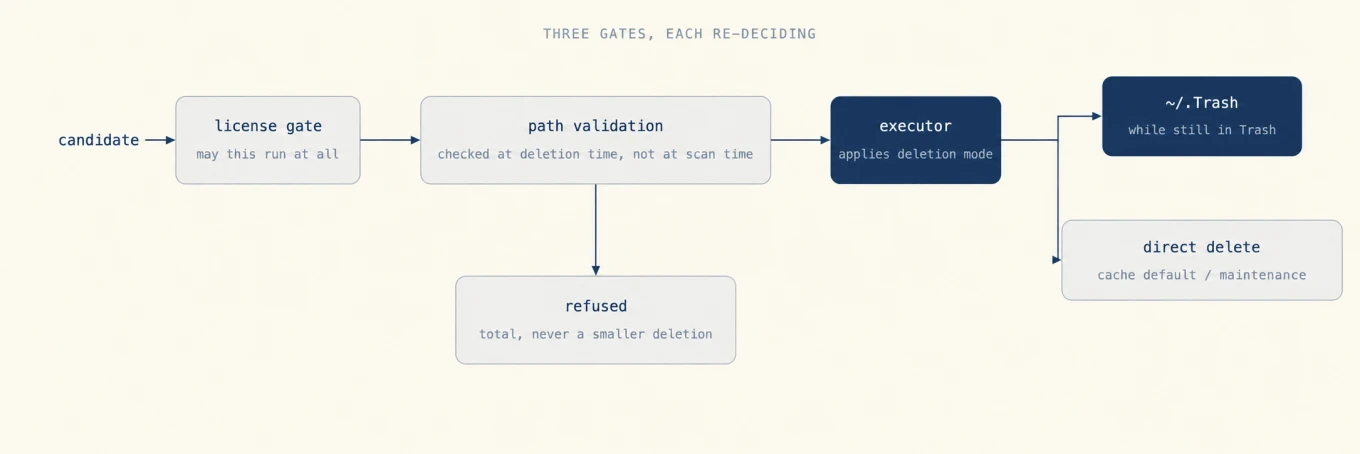
The three gates, and why the middle one is the interesting part
A candidate does not travel from the scan to the disk in one step. It passes a license gate, then path validation, then an executor, and the layers do not trust each other: each one re-checks rather than assuming the previous one was right.
Path validation is where safety actually lives. It runs at the moment of deletion, not at scan time, which matters because the two moments can be minutes apart and the disk does not hold still in between. If the file changed identity after you saw it, the deletion does not proceed on the strength of a stale decision. A real line from the log on the machine this post was written on:
2026-08-17T02:13:55Z uninstall SKIPPED /Applications/Quiet.app updated since the scan, please scan again
That is the shape of the whole safety model in one line: when the answer is uncertain, Mole declines and tells you why, rather than deleting something close enough.
The other property of that gate is that a refusal is total. A path that lands on the protected list is refused, not trimmed down to a smaller deletion inside it, and the operation stops there rather than continuing with the rest of that item.
What Mole refuses to delete
A cleaner is only as trustworthy as the things it will not do, so this list is specific rather than a promise to be careful. These are refused before any deletion runs:
| Refused | Why it is on the list |
|---|---|
/System, /usr, /bin, /sbin |
Operating system, not user data |
/private/var/folders |
Protected root; narrowly verified app-owned cache leaves can be removed during uninstall |
/Library/Audio/Plug-Ins/{Components,VST,VST3} |
Load-bearing the moment a project references them |
| iZotope and LaserSoft support directories | Licensed audio and scanner tooling that looks like inert support data |
~/.ollama/models, ~/.lmstudio/models |
Downloaded weights, often tens of gigabytes |
~/.cache/huggingface, ~/.cache/torch, ~/.cache/whisper |
Cache-shaped paths holding downloads, not derived files |
~/.cache/tensorflow, ~/.cache/wandb |
Datasets and local run records that may not have been uploaded yet |
~/.cache/pypoetry/virtualenvs |
Live interpreters; Poetry's rebuildable children stay cleanable |
| Apple Neural Engine compiled-model store | Removing it breaks recognition until the next reboot |
| System Settings, Control Center, audio services | System configuration, not cache |
| Privacy database, login items, background task registrations | Permission and startup state |
| Shared file lists behind recent-items menus | Small, invisible, and annoying to lose |
~/.config/mole |
So a cleanup cannot erase the whitelist constraining the next one |
The pattern behind the list is that a path being shaped like a cache is not evidence that
it holds one. Model weights and Python environments live under ~/.cache because that is
where tools put things, not because they are derived files anyone can regenerate for
free.
Whitelisting is the user-controlled half of the same idea. A path you protect in either
program is honored by both, because both read ~/.config/mole/whitelist.
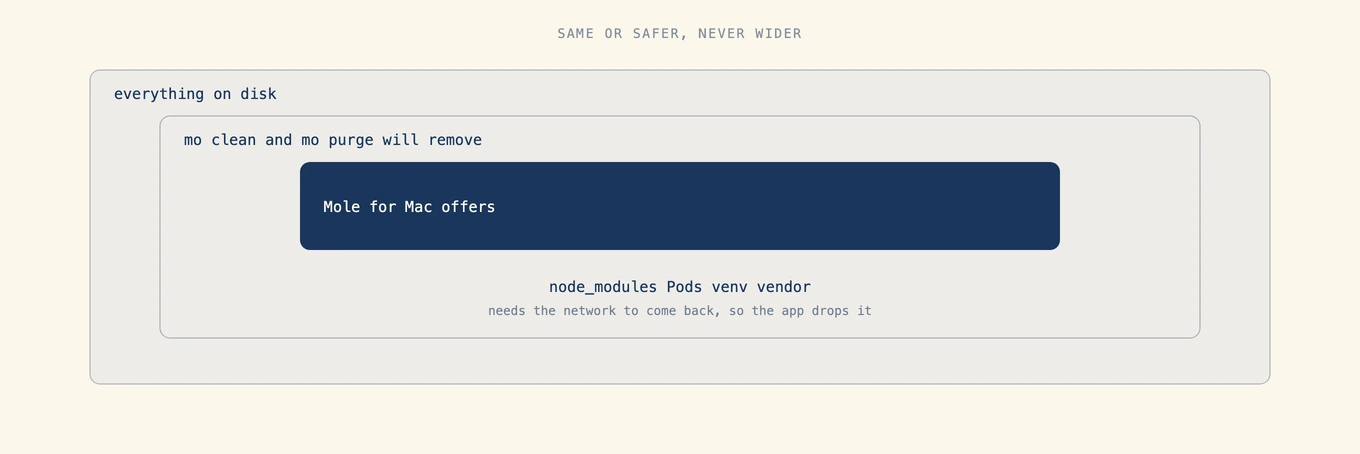
The Mac app is narrower than the CLI, in one consistent direction
The two are not equally aggressive, and the asymmetry always runs the same way. The
clearest case is dependency directories: mo purge removes node_modules, Pods,
venv, and vendor, while the app drops every one of them and offers only what a local
compile can rebuild without the network. The app also gates app-data scans behind Full
Disk Access, surfaces recoverable-but-expensive items as review-only rows rather than
preselected ones, and re-validates paths at deletion time as described above.
So seeing a category in mo clean that the app never offers is expected behavior, not a
missing feature. If you want the wider sweep, the terminal is where it lives, and
--dry-run is how you look before it happens.
Reading what actually happened
Both programs use ~/Library/Logs/mole/operations.log. The app writes tab-separated
fields; the CLI puts the timestamp and command in brackets, followed by the status,
path, and any detail. Their status names also differ:
| Status | What it means |
|---|---|
TRASHED |
Moved to the Trash at that time |
DELETED |
Removed permanently |
REMOVED |
CLI permanent removal |
SKIPPED |
Declined, with the reason in the next field |
SKIPPED_RUNNING |
The owning app was running |
SKIPPED_MISSING |
The path was gone by the time the executor reached it |
SKIPPED_ACTIVE_UPDATE |
An update was in flight for that app |
FAILED |
Attempted and did not succeed |
These records describe what happened, not where a file is now. A TRASHED file can
usually be restored while it remains in the Trash, but it may since have been restored,
moved, or emptied. Check the Trash itself before relying on recovery.
The review step
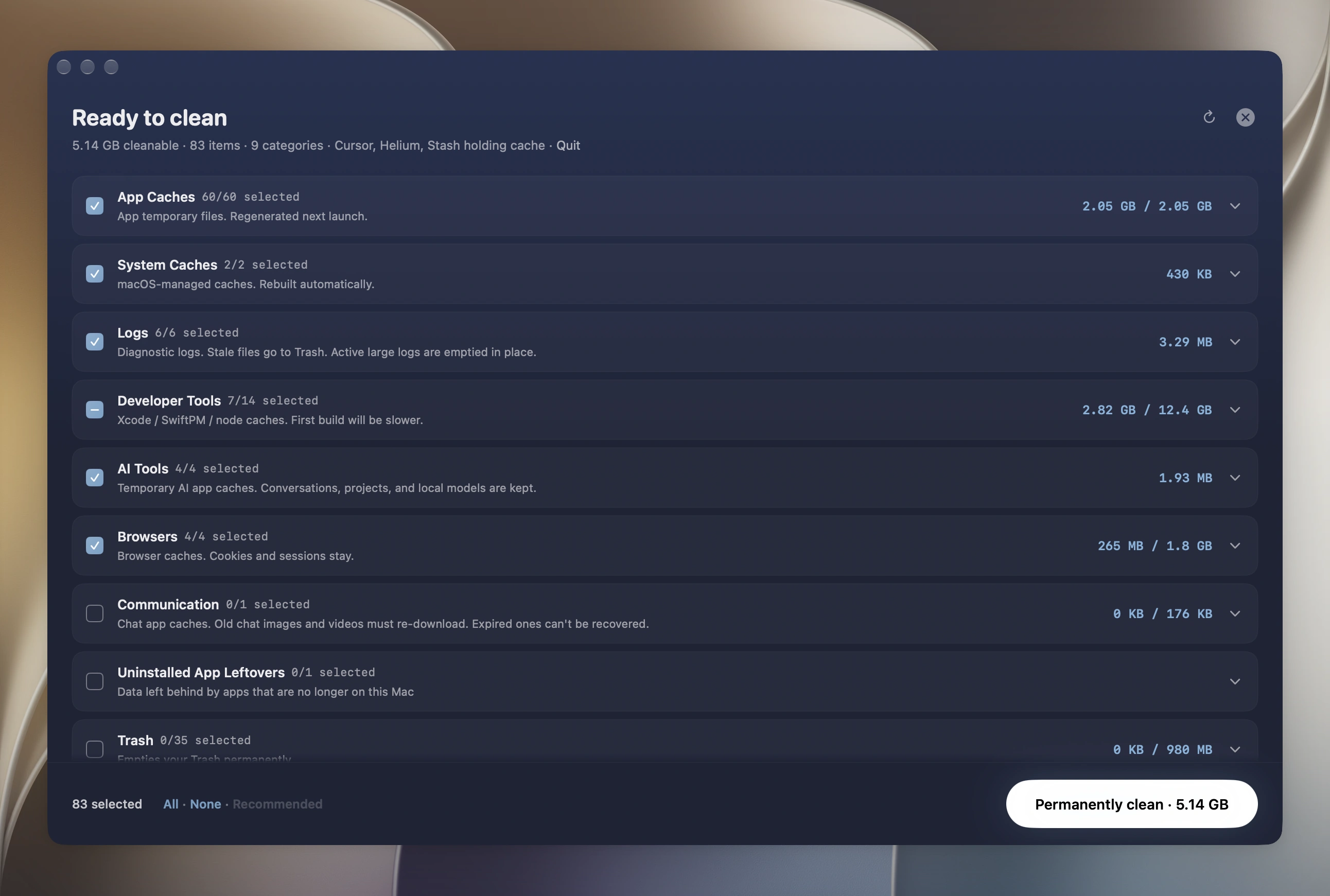
Scanning is free in the Mac app, without a license and without a time limit. Every tool scans and shows its full result list; a license is only required to act on it, and each destructive tool runs twice before asking. You can compare what Mole proposes against what you believe about your own disk before paying anything.
Uninstall shows a plan with paths, owners, and sizes before anything moves. The review is the product, not a confirmation dialog: an item you cannot evaluate is a bad candidate for a one-click sweep, which is why Mole leaves the expensive-to-restore ones unchecked instead of hiding the decision behind a total.
What is genuinely not recoverable
Being specific about this matters more than reassurance.
Cache cleanup is permanent by default in both programs. In the Mac app, you can change the setting to move caches to the Trash, where they remain recoverable until emptied. Regenerating a cache is not restoring its original contents.
mo purge deletes build output permanently, which is why it is the command that most
deserves a dry run first. The Optimize deletions listed above are immediate. None of
these restore the original contents without a backup. Time Machine or another backup
is the recovery path when you deleted the wrong thing; rebuilding a cache or project
does not restore the deleted files themselves.
How to verify any of this yourself
- Read the log.
~/Library/Logs/mole/operations.log, written by whichever front end did the work, with the status vocabulary above. - Preview terminal actions. The clean, uninstall, and optimize commands support
--dry-runand show the planned actions without executing them. - Read the code. The CLI is open source under GPL-3.0, deletion logic included.
- Check the build you downloaded. The Mac app is signed with a Developer ID and
notarized, so
spctl -a -t exec -vv /Applications/Mole.appanswers whether the copy on your disk passes Gatekeeper's assessment, not whether its bytes match a published download. - Watch the network. Neither program sends telemetry.
Claims you may read elsewhere
Three descriptions circulate widely, and all three come from reading the terminal tool and the app as one product.
"It is a terminal utility with no preview and no undo." mo clean has --dry-run preview, but cache deletion is permanent. The Mac app provides a graphical review; uninstall uses the Trash, while cache cleanup is permanent by default and can be changed in Settings.
"Mole is free." The CLI is free and open source. Mole for Mac is a one-time $19 purchase covering two Macs, with free updates and a 14-day refund.
"The CLI is MIT licensed." It is GPL-3.0.
Further reading
- Mole CLI or Mole for Mac: what each front end can do that the other cannot, and what happens when you install both.
- What Mac cleaners should never delete: the same question asked of the whole category rather than one tool.
FAQ
Does Mole move deleted files to the Trash?
In the Mac app, cache cleanup is permanent by default; Settings offers a Trash option. App uninstall and Analyze deletions use the Trash, including removals requiring administrator rights. Recovery requires the files to still be there. Emptying the Trash and the named Optimize deletions are permanent; regeneration is not restoration. The CLI deletes caches permanently and moves uninstalled apps and leftovers to the Trash.
Can Mole delete something macOS needs?
System roots, protected system state such as privacy and login item databases, audio plug-ins, downloaded model weights, and live Python environments are refused before any deletion runs. The app also re-validates each path at the moment of deletion rather than trusting the scan.
Is the free CLI the same program as the Mac app?
No. They are separate implementations that share a cleanup vocabulary, a whitelist file, and a log. The app is a Swift reimplementation, not a wrapper around the CLI, and it is deliberately narrower about what it will remove.
Does Mole need Full Disk Access, and why?
App-data scans are gated behind it. Without the permission Mole still runs; it sees less and says so rather than reporting a smaller number as if it were the whole picture.
Full Disk Access is worth understanding for what it does and does not mean. What it enables is broader visibility into protected user-data locations so a scan and review are accurate, not a blank check to delete: the same gates above still decide every removal. What it does not prove is trustworthiness. It is not antivirus certification, not an "Apple approved cleaner" mark, and not evidence that a tool is safe; a cleaner with Full Disk Access can still delete the wrong thing. Grant it only to tools you already trust, judge them by the review-before-delete, protected-path refusals, and logs described on this page, and revoke it for any tool in System Settings > Privacy & Security > Full Disk Access.
How do I check what Mole deleted last time?
Read the tail of ~/Library/Logs/mole/operations.log. TRASHED records a move to the
Trash; check whether the file is still there. DELETED and CLI REMOVED record permanent
removal. SKIPPED statuses explain what was not removed.
Does a license change what gets deleted?
No. The license gates whether a destructive operation may run at all, never how wide it is. Scanning, the candidate list, and the protection rules are identical before and after activation.