Which Mac Caches Are Safe to Delete?
"Clear caches" is only a safe instruction after you can name what will rebuild them. A folder called Caches can hold thumbnails that come back in minutes, compiled artifacts that take an evening to recreate, or files that are not caches at all: chat history, local models, deployment keys, and Git-tracked project data.
This article is a decision guide for those boundaries, especially around browsers, chat apps, and AI tools. For the Library layout and measurement commands, start with how to clear cache on a Mac. For developer tool directories, see how to clear dev caches on a Mac. For AI install residue after uninstall, see AI tool leftovers on Mac.
A disposable cache must be rebuildable
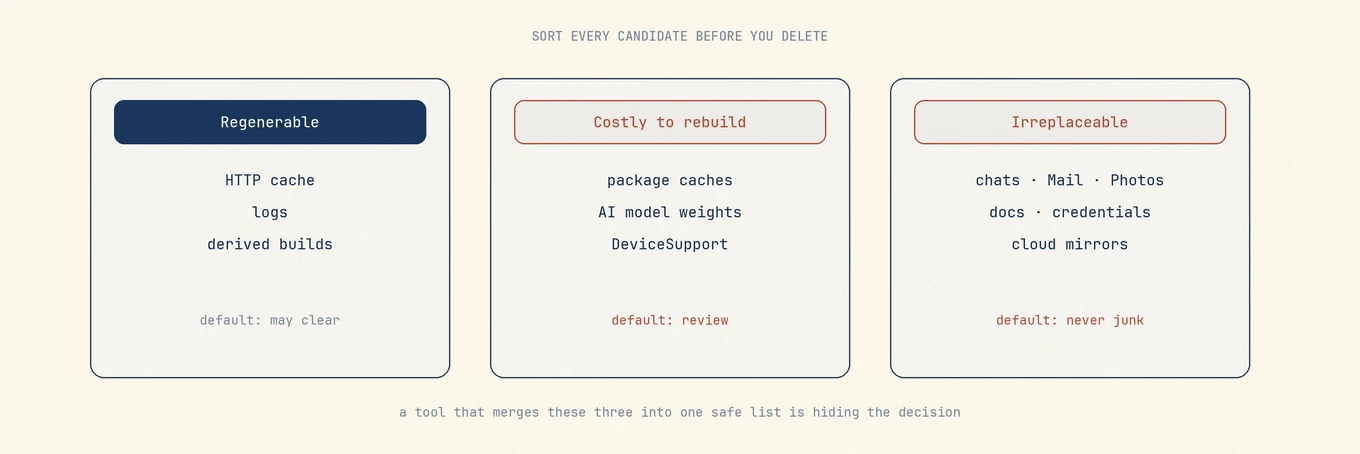
A disposable cache is a replaceable copy of data that still exists elsewhere, or that the owner can regenerate from inputs you still have. If you cannot name the source, treat the folder as state or user data.
| Classification | What is needed to restore it | Default |
|---|---|---|
| True cache | Remote file, original document, or deterministic build input still available | Review, then clear with the owner's UI when possible |
| Session / state | Tabs, cookies, window restore, auth tokens | Keep unless you want a reset |
| User data | Chats, media libraries, profiles, credentials | Never treat as generic cache |
| Local model / offline pack | Large download chosen for offline use | Keep unless you accept the re-download |
| Build artifact | target, .build, derived data with a known project |
Clear when you can afford the next compile |
Apple's developer documentation draws a similar line: cache data should be regenerable; Application Support can hold resources the app needs to run.
Caches that can usually be cleared after review
These categories can usually be rebuilt when the following conditions are met:
- Browser cached images and files when you use the browser's own clearing UI and leave cookies, passwords, and site data alone.
- Thumbnail and icon caches after you accept a slower first browse of large folders.
- Package-manager download caches when the tools document a cleanup command (
brew cleanupis the Homebrew example people actually mean). - Rebuildable language/tool caches such as SwiftPM and Cargo artifacts when the project and toolchain are still present.
- App-specific CDN or media caches that the vendor labels as safe to remove inside its settings.
Even here, quit or pause the owner when the tool asks. Deleting an open cache database is how you get a "repaired" app that loses a week of offline state.
Keep by default
| Item | Why it is not "just cache" |
|---|---|
| Chat history and attachments (WeChat, QQ, Feishu/Lark, and similar) | Often the only local copy of conversations and media |
| AI chat threads and saved prompts | User records, not disposable CDN bytes |
| Local model weights | Large intentional downloads; clearing them is a storage decision, not hygiene |
Deployment keys, tokens, .env style secrets |
Credential material that may never be shown again |
| Git-tracked files and project working trees | Source of truth; a cleaner that can touch them is mis-scoped |
| Mail, Photos, and password manager stores | User data regardless of folder name |
| Active build directories still in use | Deleting mid-compile corrupts the next run |
If a tool does not explain which data it protects, review each item instead of using Select All.
AI and chat tools: clear the right slice
AI desktop apps and coding agents often store four types of data together:
- CDN / HTTP caches – usually safe after review.
- Conversation databases – user data.
- Local models and embeddings – expensive voluntary downloads.
- Tooling caches (indexers, Electron GPU caches, language servers) – often safe when the app is quit or when the cleaner can refresh in place.
Clearing (1) and (4) can reclaim space without erasing your work. Clearing (2) or (3) because a dashboard said "cache" is how people lose threads and re-download multi-gigabyte models by accident.
The same split applies to chat apps: stickers or proxy caches may be disposable; message databases and media libraries are not. Prefer in-app storage settings when they exist. Prefer a cleaner that leaves chats and media unselected by default when you use a third-party review list.
Five questions before deleting
- Who owns this path (bundle id or documented tool)?
- What exact source rebuilds it?
- How much time, battery power, and network traffic will rebuilding use? Do you need the files offline?
- Is the owner running, and does anything else have the files open?
- Can you undo (Trash) or is the tool using permanent deletion?
Keep the files if an answer is unclear. A short list of files you can restore is more useful than a large reclaimed-space number.
Measure, then clear, then verify
du -sh ~/Library/Caches/* 2>/dev/null | sort -h | tail -20
Read from the bottom. Match each large child to an owner. After a cleanup:
- Relaunch the owner and confirm sign-in, recent projects, and chat history still behave.
- Run one representative task (build, browse, open the AI thread you care about).
- Check free space with the same tool you used before; APFS snapshots and purgeable space can make Finder disagree with
du.
Do not chase System Data as if it were a folder. Apple's storage categories are summaries, not deletion targets (Mac storage).
Where Mole fits
Mole's Clean view lets you review caches before removing them. It can clear rebuildable caches for browsers, chat apps, and AI tooling while keeping chat history, deployment keys, and Git-tracked files protected. Older WeChat chat images and videos appear only as unselected items for you to review, because expired media cannot be downloaded again. Apps that are holding a cache can be quit from Clean so the list can refresh without a full rescan. Categories you mark Never Clean stay out of the way until you undo that choice. Slow folders are not allowed to stall the whole scan.
Mole helps identify files and review the selection. Use the app’s own controls when its developer documents a specific reset procedure. Keep the files if you do not know how to recover them.
FAQ
Can I delete all of ~/Library/Caches?
No. It contains data from different apps. Review each app separately and check how the files can be rebuilt, preferably using its own cleanup controls.
Will clearing caches speed up my Mac?
Sometimes a full disk slows indexing and scratch space, so reclaiming rebuildable caches helps storage pressure. It will not fix a CPU, thermal, or memory bottleneck, and the next miss may use CPU and network to rebuild.
Are AI model folders safe to delete?
Only if you accept re-downloading them. They are usually intentional offline assets, not accidental junk.
Does Mole delete chat history when cleaning WeChat or ChatGPT caches?
Mole's cleanup paths are written to keep chat history and similar personal data protected while offering rebuildable caches for review. Still read the on-screen selection before you confirm; never assume Select All is appropriate.