Building AI Tool Cleanup and Care into Mole

Over the holiday I wanted to add something useful to Mole: a way to clear AI caches, old sessions and worktrees you no longer need, and uninstall AI tools you tried long ago and have stopped using.
While I was testing uninstall leftovers from hundreds of Mac apps, plenty of people also asked about AI junk. At the time I saw much of that “junk” as useful. Your AI coding conversations, for example, are an important asset, so Mole mostly handled actual caches and old versions.
As I kept using AI, though, my own Mac accumulated plenty of generated files, sessions and worktrees that were no longer very useful. That made the need clearer, and I started working on it. One user also had an opencode.db file that had grown to 62 GB and asked how to clean it. This time I installed desktop and command-line tools, signed in and used them before checking what they left behind.
How I tested them
Unlike last time, when apps were only installed and removed, this time I signed in to the tools I could use and tried them in my own projects: asking questions, running agents, building a code index, setting up a scheduled task. A lot of data only appears after real use, so an app that is installed but never opened hides most of it. For each tool, AI compared the Mac before and after, measured what it wrote into the home folder, ~/Library, /usr/local/bin and the shell configuration, and recorded it in a ledger. Then I looked at how many processes and how much memory it took in Mole's Status page, uninstalled it with Mole, and searched the whole home folder by name for anything Mole had not listed. Whatever was missing went into the code the same night, followed by a retest.
On the desktop side I tested 13 apps: Devin, OpenCode, Trae, Trae CN, TRAE SOLO CN, Kiro, Qoder, QoderWork, Qoder CN, Lingma, CodeBuddy CN, WorkBuddy and Doubao Work. Twelve were actually used; Lingma had no quota after signing in, so I only measured the files it wrote. On the command line I installed and ran Amp, opencode, Kimi CLI, Kimi Code, Factory Droid, Copilot CLI, Gemini CLI, Qwen Code and iFlow, and together with Claude Code, Codex, Grok and Cursor Agent, which were already on my Mac, that makes 13. Following the list CC Switch supports, I also measured what OpenClaw, Hermes and Pi leave behind after removal. Amp stood out as well made, with a strong character of its own. Qoder CN was probably the best Chinese AI product I had tested that day, simple and clear overall. A few could not be used: I could not sign in to Gemini CLI with my personal Google account during this test, and Qwen Code and iFlow both need an endpoint and key of your own.
You only see what they write once you use them
Memory was the most visible part. With the 13 desktop apps open together they used about 23 GB, and CodeBuddy CN alone ran 41 processes using 4.49 GB. Most of them are VS Code or Electron apps, where one window hides a chain of helpers, which is why Mole's Status page gives each app a single row that adds all of its child processes together. Looking at a plain process list, it is hard to tell who is actually using the memory.
The small changes they make to the system were more surprising. Devin, CodeBuddy, Kiro and Kimi Code add PATH or shell-integration lines to ~/.zshrc, and on first launch Kiro, Trae and Trae CN put a root-owned command link in /usr/local/bin, which points at nothing once the app is gone. WorkBuddy put a python3.12 in ~/.local/bin, so typing python3.12 in Terminal afterwards runs its copy, and it installed a 127 MB uv Python as well; my words at the time were that it was more intrusive than I expected. The most interesting was Kimi CLI: I ran it once, it told me it was no longer maintained, and then, without asking, it downloaded and installed the new Kimi Code, edited .zshrc, and renamed the old command to kimi-legacy.
On size, the first use of TRAE SOLO's Work mode downloads about 1 GB of tools that unpack to 3.1 GB, a bundled set of LibreOffice, FFmpeg and OpenJDK, and six desktop tools that each ran only one or two tasks wrote 5.2 GB of data between them. My own ~/.codex, which I use daily, is already 24 GB, 17 GB of it sessions, and 12 GB of the Claude desktop app's 14 GB is the Linux virtual machine Cowork uses. opencode's database records events, so one question writes more than three times the size of the message itself, and deleting a session does not shrink the file, which is probably how someone reached 62 GB.
Skills were another trap. Many skill installers write a skills/ folder into every agent's directory whether or not you have that agent, so ~/.qwen, ~/.iflow and ~/.factory existed on my Mac although I had never used Qwen Code, iFlow or Droid. The first version of Mole even counted them as 2.4 MB tools and came close to treating my installed skills as leftovers.
Some things stay after uninstalling
After the first round removed 14 apps, a new search still found more than a dozen dot folders Mole had not listed, such as ~/.kiro, ~/.qoder, ~/.qodersec, ~/.lingma and ~/.codebuddy, plus the sign-in token file Kiro keeps in ~/.aws. They are not under ~/Library, and their names do not always match the app, so the only way to find them was one app at a time. Some are shared between products: Trae CN and TRAE SOLO CN share ~/.trae-cn, Qoder and QoderWork share ~/.qoder, so removing one of them must not list a folder the other still uses. Testing the international Trae also showed it claiming Trae CN's folders as its own, with the caches ticked by default; after the fix its list went from 33 rows to 14.
Processes were the other surprise. Checking again the next morning, ~/.kimi-code and ~/.factory had come back after being deleted, because the kimi and droid sessions I had left open in Terminal the night before were still alive: their program files were already in the Trash, and the processes kept writing logs into those folders. Then I found gemini, qwen, iflow and amp sessions still running too. Command-line tools have no window, and closing a Terminal tab does not always end them, so it is worth checking that one is not running before you uninstall it.
The testing also reminded me why I use Claude, Codex and Cursor so often: they have been fairly restrained. Some other tools left me uncomfortable. I saw installers write to the clipboard to track the installation channel, which felt like going too far, and apps that greeted me with pop-ups asking me to join promotions for tokens. Using them sometimes meant putting up with a lot of irritation.
Qoder was a pleasant surprise. It showed restraint and good taste, and the product impressed me. I hope to see more Chinese software like it. Keep going.
You can take a look yourself first
None of these checks needs Mole; Terminal is enough, and the commands below only read, they change nothing.
First, see whether AI tools added lines to your shell configuration:
grep -nE "codeium|codebuddy|kiro|kimi|lmstudio|\.local/bin" ~/.zshrc ~/.bashrc ~/.zprofile 2>/dev/null
Each line starts with the file name and line number. If the tool behind a line is already gone, you can delete the line in a text editor; copy the file first, and open a new Terminal window afterwards to check that everything still works.
Next, look for commands in /usr/local/bin that point into an app, and for links that no longer work:
ls -l /usr/local/bin | grep "\.app/"
find /usr/local/bin -maxdepth 1 -type l ! -exec test -e {} \; -print
The first lists commands pointing inside an app, the second lists links whose target is gone. Most of those are left behind by removed apps; they belong to root, so deleting them needs an administrator password.
See whether a command-line agent you already removed is still running:
ps -axo pid,lstart,command | grep -E "kimi|droid|gemini|qwen|iflow|amp|opencode" | grep -v grep
This is a text search by name. Inspect the full command and process ID to confirm each match belongs to the AI tool; amp can also occur inside unrelated words. After confirming, quit in the original Terminal, or use kill with that process ID if you cannot find the window.
Finally, measure how much these tools take:
du -sh ~/.codex ~/.claude ~/.grok ~/.gemini ~/.cursor ~/.local/share/opencode 2>/dev/null
These folders hold your session history, so decide whether you will want to look back before deleting anything: an AI conversation deleted without a retained copy cannot be recovered.
Find out what a large folder contains
One AI tool’s folder can contain rebuildable caches, downloaded models, conversations, projects and configuration shared with another tool. A cache-like name does not make every file disposable. For manual cleanup, inspect rebuildable data first, then check titles, dates and backups for your own work. For a worktree, check both uncommitted changes and whether its commits are preserved on a branch you intend to keep.
An unchanged opencode.db after deleting sessions does not necessarily mean deletion failed. SQLite documents that deleted records usually leave pages available for reuse without shrinking the file. Compaction reclaims those empty pages; it does not delete another round of conversations. Decide which sessions to remove before maintaining the database, rather than combining both into one large delete action.
How Mole handles it now
The AI page is currently in Preview and still needs testing before the next release. Its entry is a far Moon on the Clean page, which appears only when data from AI tools is found and can be hidden in Settings if you do not want it. Inside, Mole goes through the tools one by one and sorts what it finds into three bands by how much you could regret removing it: caches and old versions rebuild themselves and start checked; sessions and worktrees do not rebuild themselves, so you confirm them yourself; long-unused tools and maintenance come last and are not checked either.
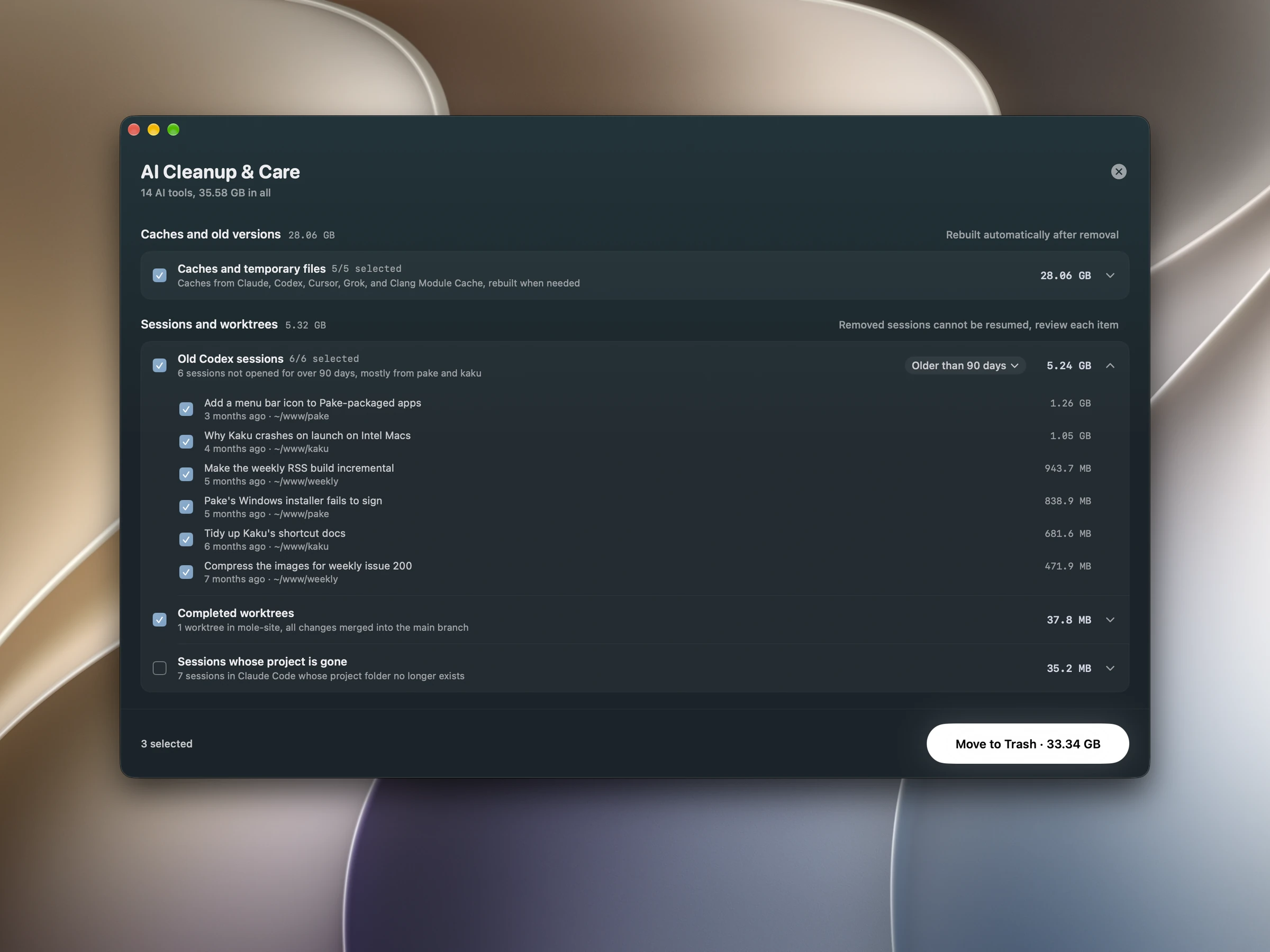
In the sessions band, old Codex sessions beyond the retention period can be filtered at 15, 30, 90 or 120 days, and once expanded each one shows its title and date and can be unchecked on its own. Mole first copies the session file to the Trash and then calls Codex's own delete command, so Codex's index stays consistent. For Claude Code it lists only sessions whose project folder is gone, and a finished worktree appears only when git can prove it has no uncommitted changes, with a note when its work is already merged into the main branch.
The unused-tools band took the most time this round. Mole looks for AI command-line tools in the fixed places npm, pipx, uv, official installers and Homebrew use, lists only those unused for 30 days and not running, and removes the program, the command links pointing at it, and its settings, sessions and sign-in together. Data another product still uses stays: Antigravity also keeps things in ~/.gemini, and opencode's desktop app shares a session database with its command line. With more than four unused tools, the three largest get their own rows and the rest fold into one. Claude Code and Codex are not on the list, because their folders are also the desktop apps' state.
Command-line tools installed into system folders with sudo npm are listed too, and removing them asks for an administrator password once. For opencode's ever-growing opencode.db, once deleted sessions have left more than a tenth of the file empty and the file is over 200 MB, Mole offers to compact it in this band: no session is removed, only the free space goes back to the disk, and opencode has to be quit first.
On the uninstall side, the dot folders above are now listed as rows to confirm, unchecked by default, and a folder several products share is not listed while another of them is still installed. Root-owned command links in /usr/local/bin are listed during uninstall too and move to the Trash through Mole's administrator helper. Ordinary files moved to Trash can be retrieved while they remain there. Homebrew-installed programs still use Homebrew’s uninstall command. Database sessions need the exported recovery file and its restore instructions; not every operation can be reversed by dragging something out of Trash, and the recovery copy must still exist.
These changes ship with the next version of Mole.
What is not done yet
Some things are not done yet. Mole will not edit your shell configuration for the lines AI tools add; the plan is to name those lines in the uninstall details instead. Worktrees from tools such as Cursor and Conductor are not included because I do not have real data for them on my Mac yet. At the time of that test, old opencode and Devin sessions could not be cleaned by age in Mole. I have not tested MiniMax this round, so it is not supported yet.
Follow-up: OpenCode and Devin sessions
On October 1 I added source support for old OpenCode and Devin sessions, using the retention filter or checking that their working folders are provably gone. Offline disks and unreadable folders do not count as missing. Mole saves a recovery copy before deletion, then uses the tool’s deletion route and verifies the result. OpenCode recovery uses its exported JSON; Devin recovery contains the selected session and its related records, with restore instructions. A running tool or a failed check prevents cleanup. This was work for the next Preview, not a feature in the download published at the time; I have not measured reclaimed space on the user’s real database.
Together with the earlier tests of more than 700 apps, this left me disappointed by how many products fall short of basic software engineering principles. They are not always as professional or clean as people expect. It makes me want Mole to keep its simplicity, deepen what it does, avoid grabbing data it does not need, and never upload local files or conversation content. I do not even add usage analytics. I want to keep being this particular about it for the long run.
If there are AI tools on your Mac you would like Mole to take care of, or a kind of cleanup that bothers you most, tell me in the discussion thread. Every app tested so far is in the tested apps list, and if you want to clean up by hand, the AI coding tools cleanup guide covers it.
I will include requests in testing and add what proves suitable for cleanup. This is something I expect to keep maintaining for a long time.