Clean Up AI Coding Tools on Mac: Caches, CLIs, Transcripts

A disk that was comfortable for two years can fill up within a few months of using coding agents every day. The agents themselves are small. What changed is how often the machine compiles, how often a CLI replaces itself on disk, and how much of your own reasoning now lives in your home directory as text. Almost all of the growth falls into three categories, and they need three different decisions, because they cost three very different amounts to get back.
Model weights are the obvious suspect and usually the wrong one for this particular problem. Ollama, LM Studio, and Hugging Face keep content-addressed stores that only their own tools can safely prune, and that is covered separately in removing AI tool leftovers. This article is about what AI coding agents leave behind while you work.
Measure before you delete anything
Two commands answer most of the question. The first totals the agent home directories:
du -sh ~/.codex ~/.claude ~/.local/share/claude ~/.grok ~/.cache 2>/dev/null | sort -h
The second finds build output scattered across every project you have ever opened. Replace the roots with wherever you keep code:
find ~/www ~/Projects -maxdepth 3 -type d \
  \( -name target -o -name node_modules -o -name .next -o -name dist -o -name build \) \
  -prune -exec du -sh {} + 2>/dev/null | sort -h | tail -20
-prune stops find from descending into a directory it already matched, which matters
here: without it, find walks every file inside a 24 GB target/ before moving on. On
the Mac I measured while writing this, the top two lines were a Rust target/ at 24 GB
and a Tauri project's target/ at 9.8 GB, against node_modules trees ranging from
134 MB to 1.5 GB. In this sample, the Rust build output was much larger
than any of the individual dependency directories listed.
If you would rather see this as a map than a list, Mole's Analyze view draws the
same volumes as a treemap and lets you drill into the largest rectangle, which is faster
than guessing which root to pass to find.
Category one: build output, amplified
This category is not new. The volume is. A developer working by hand compiles a few times a day. An agent working through a task compiles after nearly every edit, runs the tests, tries a second approach, and compiles again. Caches that used to grow over months now grow over an afternoon, and incremental build directories are designed to trade disk for speed.
Rust is usually the largest by a wide margin. A target/ directory holds compiled
dependencies, incremental compilation state, and build script output, kept separately per
profile, so debug and release are two full copies. cargo clean with no options
"will delete the entire target directory". Preview it first:
cargo clean --dry-run
cargo clean --release
cargo clean -p <package> cleans only the named packages, which is the right tool when
one workspace member is the problem.
JavaScript spreads output thinner. Beyond node_modules itself there is
node_modules/.cache (used by bundlers and transpilers), .next for Next.js builds, and
whatever dist or build your toolchain writes. Find the caches specifically:
find ~/www -maxdepth 4 -type d -path '*/node_modules/.cache' -prune -exec du -sh {} + \
  2>/dev/null | sort -h | tail
Python leaves __pycache__ beside every package it imports. Individually tiny, and
there are thousands of them. Count them before removing, because the same command shape
with rm -rf on the end is unforgiving if a root is wrong:
find ~/www -type d -name __pycache__ -prune -print | wc -l
Bytecode caches regenerate on the next import with no network access at all, so this is the safest thing in the whole article to delete.
Go keeps one global build cache rather than per-project directories. go env GOCACHE
prints its location and go clean -cache "causes clean to remove the entire go build
cache". go clean -testcache expires cached test results without discarding compiled
packages. On my machine the build cache was 183 MB against a 38 MB module cache, so the
build side is worth checking even when the downloaded modules are small.
Xcode needs its own treatment, because DerivedData, archives, device support, and
simulator runtimes are four kinds of thing with four different restore costs. The
DerivedData folder on this Mac measured 9.3 GB.
Cleaning up Xcode storage covers which of those you can
delete and which you keep for symbolication. Gradle and Maven split the same way between
per-project build/ directories and a global store under ~/.gradle or ~/.m2, and the
global side belongs with the other registries in
clearing developer caches.
Category two: superseded CLI versions
This is the one almost nobody looks for, and on a machine that runs several agents it is often larger than every cache combined.
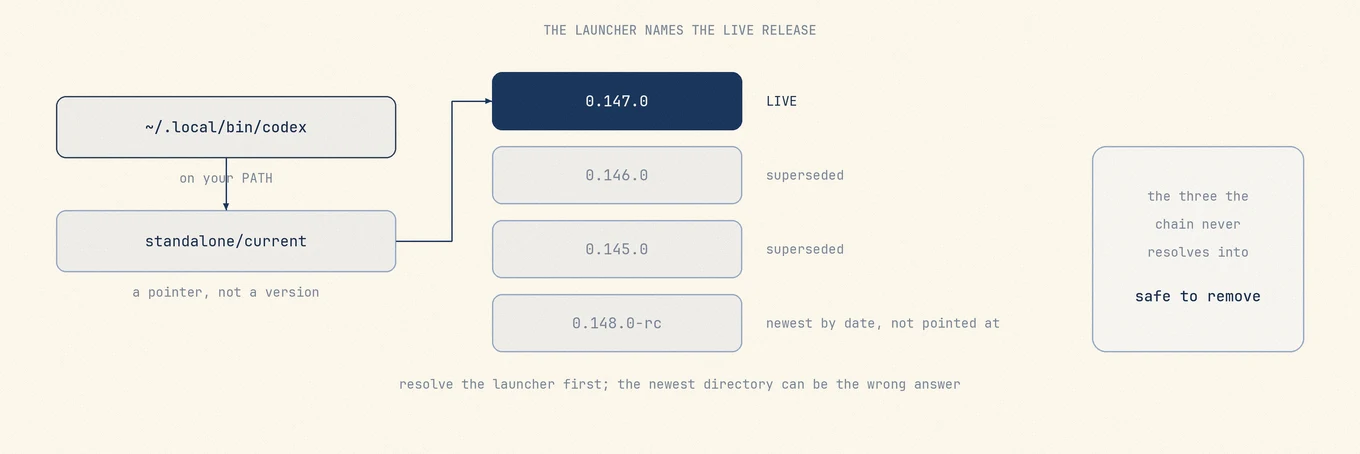
Agent CLIs update themselves by downloading a complete new versioned release and pointing a launcher at it. Each release is self-contained, so it shares no files with the release before it. The pointer moves. The old release stays. Nothing sweeps it, so the count grows by one on every update, forever.
The layouts follow one pattern with cosmetic differences:
- Codex keeps
~/.codex/packages/standalone/releases/<version>-<arch>/, with acurrentsymlink one level above pointing at the live one. - Claude Code keeps
~/.local/share/claude/versions/<version>, where each entry is a single executable file rather than a directory, and~/.local/bin/claudeis a symlink to the live one. - Grok keeps
~/.grok/downloads/grok-<version>-macos-<arch>as files, with~/.grok/bin/grokand~/.grok/bin/agentpointing at the current build. - Cursor Agent keeps
~/.local/share/cursor-agent/versions/<date>-<sha>/, with~/.local/bin/cursor-agentas the launcher. - Cursor, the desktop app, also keeps its own copy of the agent in
~/Library/Application Support/Cursor/User/globalStorage/anysphere.cursor-agent-worker/agent-cli/.local/share/cursor-agent/versions/, withbin/cursor-agentin the same.localfolder as its launcher. On the Mac measured later it had kept seven releases, 4.1 GB. - GitHub Copilot CLI installed through npm replaces itself in place, but its install
script writes a versioned package under a prefix defaulting to
$HOME/.localfor a non-root user. Mole checks~/.copilot/pkg/universalfor the same shape.
Measure all of them at once:
du -sh ~/.codex/packages/standalone/releases/* \
       ~/.local/share/claude/versions/* \
       ~/.grok/downloads/* \
       ~/.local/share/cursor-agent/versions/* 2>/dev/null
On the Mac I used for this article that printed five Codex releases between 262 MB and 310 MB, five Claude Code binaries between 293 MB and 306 MB, two Grok builds, and two Cursor Agent versions. Roughly 3.5 GB total, of which about 920 MB was live. Everything else was a binary that had already been replaced. Codex's own issue tracker has an open request for this, where the reporter measures the growth at roughly 250 MB per update (openai/codex#22293).
Resolve the launcher before you delete a single directory
The tempting shortcut is to sort by date and keep the newest. Do not. Two ordinary situations break it: you pinned an older version deliberately after a regression, or an update staged the new directory before flipping the pointer. Deleting the live release leaves you with a launcher pointing at nothing.
Ask the launcher instead. It is a symlink, so resolve it:
readlink -f "$(command -v codex)"
readlink -f "$(command -v claude)"
readlink -f "$(command -v grok)"
That prints the real target, for example
~/.codex/packages/standalone/releases/0.147.0-aarch64-apple-darwin/bin/codex, and
ls -l "$(command -v codex)" shows each hop instead of the final answer. Whatever comes
back identifies that launcher's version. Before Trashing a sibling, check that no other
process, update, or installation uses it. Keep uncertain items and test the CLI before emptying the
Trash.
Category three: agent working state, which is not junk
The third category is the one where a cleaner can do real damage, because it looks exactly like the first two.
Session transcripts, memories, plans, and generated attachments live under
~/.codex/sessions, ~/.codex/archived_sessions, ~/.codex/memories,
~/.claude/projects, and ~/.grok/sessions. They are JSONL files named by session id,
timestamped, append-only, and they never stop growing. Every heuristic a generic cleaner
uses says log file. On the Mac I measured, ~/.codex/sessions was 9.8 GB,
~/.claude/projects was 2.7 GB across 2,362 transcript files, and ~/.grok/sessions was
1.3 GB: a large, tempting number attached to files that look disposable.
They are not logs. A transcript is the record of how a change was arrived at: the approaches tried and rejected, the constraint that ruled one out, the reason the final shape is what it is. That reasoning exists nowhere else. The commit message records what changed, the code records the surviving option and not the four discarded ones. Months of it accumulate quietly, and you discover the value the first time you go back to ask why something was built that way.
The bigger risk is not a third-party cleaner. Claude Code ships its own retention sweep:
cleanupPeriodDays defaults to 30 days, and at startup it deletes transcripts under
projects/, plan files, pre-edit snapshots in file-history/, and per-session task lists
older than that. Its
.claude directory reference
documents exactly which paths are swept and which are kept indefinitely. If you want a
year of transcripts, raise that number now rather than discovering the default after the
fact. The same page documents claude project purge for the opposite case, when you want
one project's state gone deliberately.
Mole's Clean scan never touches any of it. Those five paths, plus ~/.claude/file-history,
~/.claude/plans, ~/.claude/tasks, ~/.codex/attachments, and
~/.codex/generated_images, are on its protection list at any age. There is no age gate,
no "older than 90 days" carve-out, no setting to enable one. An age-gated exception was
built for these paths once and reverted the same day, because an old transcript is not a
stale transcript.
Old sessions do get a separate path, one you walk yourself. The far Moon on the Clean page opens AI Cleanup & Care, which keeps a retention window for each tool and lists the Codex and Claude Code sessions past it, plus Claude Code sessions whose project folder is gone, each with its title and date, and nothing is removed until you check it. A Codex session is copied to the Trash first and then removed through Codex's own command, so its index stays whole, and the images and notes Codex rendered for it go to the Trash with it. A session used in the last 24 hours never appears on the list, so you can clean while Codex and Claude Code are open, and memories, plans and skills are not on any list there either.
Under the hood: sort by restore cost, not by size
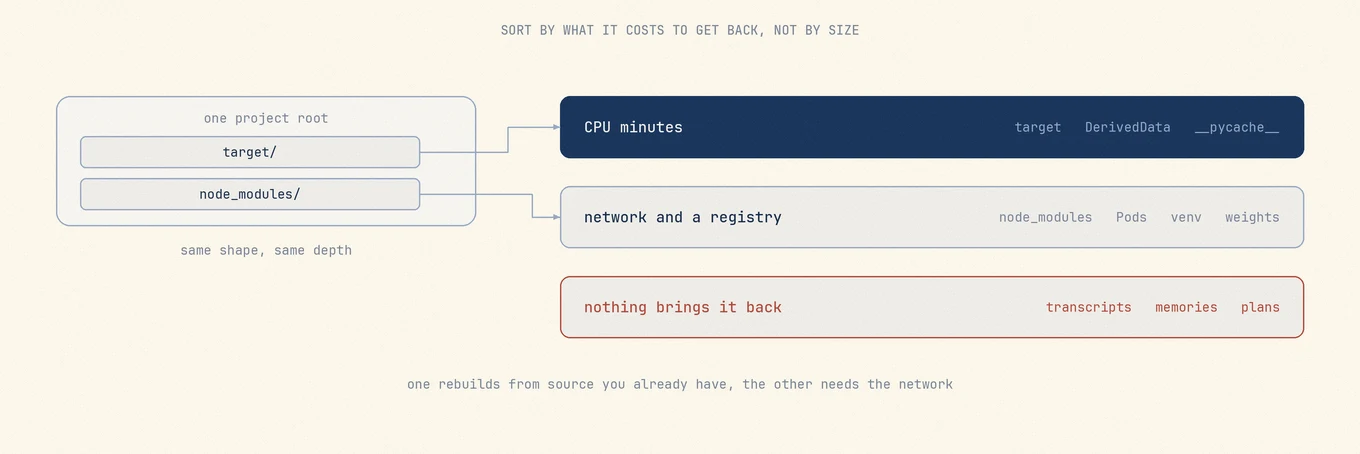
This is the rule that makes all three categories decidable, and it is the only thing in this article worth memorizing. Rank every candidate by what it costs to get back, not by how many gigabytes it shows.
Regenerable locally. Build output, incremental compilation state, bytecode caches, DerivedData. The cost of deleting these is CPU minutes on a machine you are already sitting at, with no network involved when the required sources and dependencies remain. Stop active builds and verify that the selected output can be recreated before deleting it.
Expensive to rebuild. Package registries, node_modules, CocoaPods, Python virtual
environments, vendor directories, model weights, iOS DeviceSupport. Recreating these may
require network access, the original downloads or package versions, and a compatible
toolchain. The real cost is not just minutes on a good connection, it is
whether you can work at all on a train. Review these one at a time.
Irreplaceable. Chat transcripts, agent memories, plan files, project state, local fine-tunes. No amount of CPU or bandwidth brings these back. They never belong in a batch delete, and they should not be the kind of thing you can select accidentally.
The trap is that tier one and tier two look identical. target/ and node_modules/ are
both large directories at a project root, both full of dependency artifacts, both listed
in .gitignore, both regenerated by a single command. Sorted by size they sit next to
each other. cargo build can recreate target/ locally when the required sources,
dependencies and toolchain are available. npm ci may need registry downloads as well as
a valid lockfile. Either can take substantial time, depending on the project; an unavailable
dependency can stop the rebuild entirely. Treating their recovery costs as identical is a mistake, and it is
why "delete the biggest folders" is bad advice even when it frees the most space.
Doing this in Mole
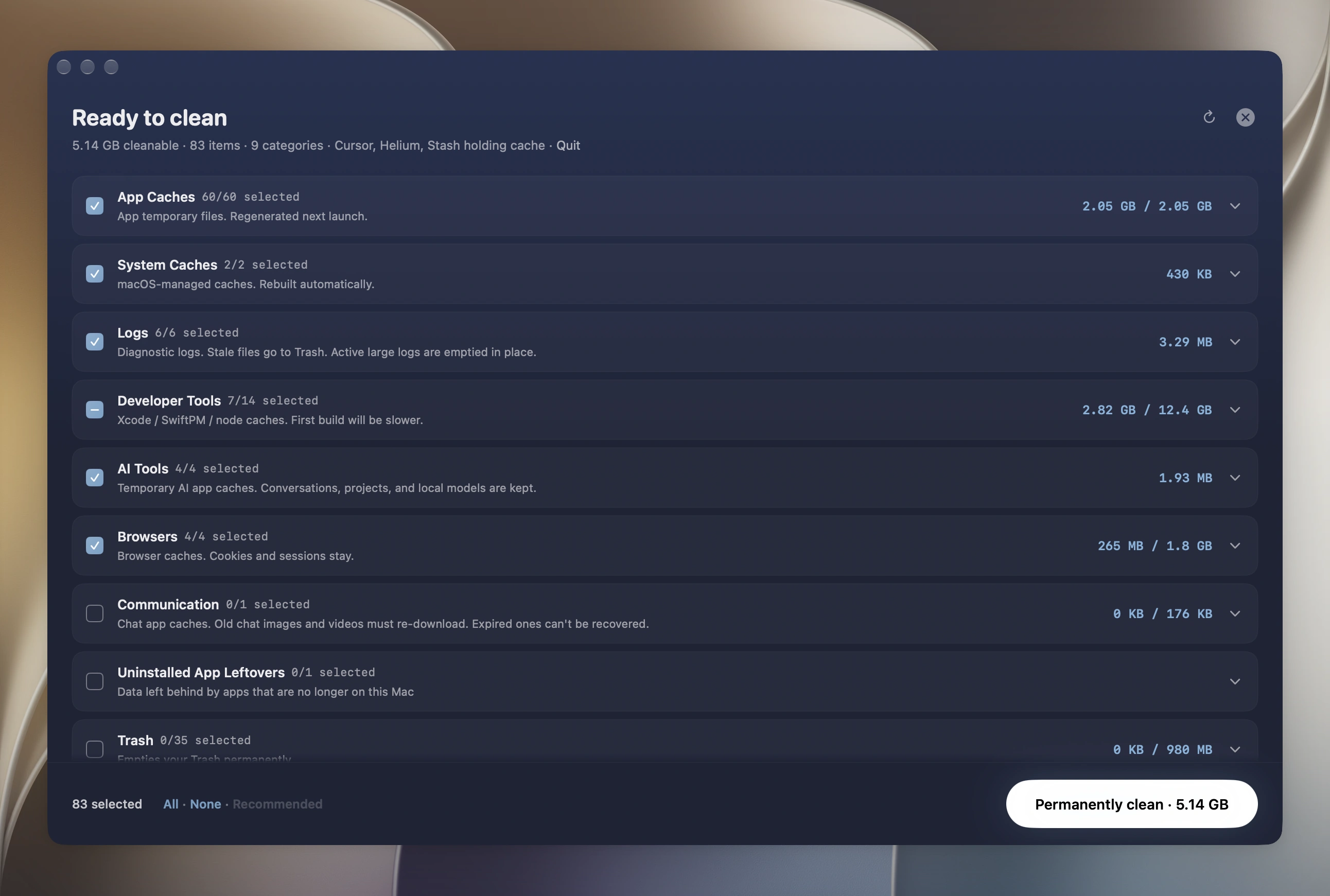
The manual route works and costs nothing. What Mole adds is that all three categories arrive in one reviewed list with the tier boundary already applied, so you are not the one remembering which dot directory holds transcripts.
Open the Clean tool and run a scan. Scanning is free and needs no license. Every candidate arrives with its exact path, its owner, and its measured size, and nothing moves until you approve the list. Anything low-confidence arrives unchecked, so the default action is always the smaller one. Caches are permanently deleted by default. You can choose Trash in Settings and restore files while they remain there. Batch results also report skipped and failed items.
For the superseded CLI versions specifically, Mole does the launcher resolution described above for you. It reads the launcher symlink for each agent CLI, resolves it to the live release, and excludes that release from the candidate set, so a deliberate downgrade stays intact rather than being treated as an old version. The measured case behind that behavior is Codex: five releases at 1.2 GB with only one live. Cursor's own copy inside the desktop app is handled the same way, and an old release can go while Cursor is open, as long as no process has it open.
The Mole CLI is free, open source, and covers the same job
from a shell with mo clean; commands such as clean, uninstall and optimize support
--dry-run to preview their actions. Both share the user-editable exclusion list at
~/.config/mole/whitelist and one operations log at ~/Library/Logs/mole/operations.log,
and everything runs locally with no upload and no telemetry.
Worth stating plainly: Mole is not a backup, not a malware response, and not a substitute for a vendor uninstaller on software that ships drivers or system extensions. It never deletes model files itself, and ordinary Clean never touches AI chat history: old sessions and Ollama models unused for a month leave only from AI Cleanup & Care, one checkbox at a time, and Ollama's own command removes the models. Other models stay with the tools that own them.
Keeping it from coming back
Three configuration changes cover most of the regrowth.
Point Rust at one build directory. CARGO_TARGET_DIR sets the "location of where to
place all generated artifacts", so every project writes into one tree you can measure and
clean in a single place. The trade-off is real: Cargo locks the build directory, so two
projects sharing one target dir build one at a time rather than in parallel. If you run
concurrent builds routinely, keep them separate and schedule a sweep instead.
Prune the global stores on a schedule, not by hand. Modern Cargo already removes
unused entries from its global cache during normal build and fetch commands, and npm
describes its cache as self-healing with npm cache verify as the maintenance command.
Let those policies run rather than deleting home-directory dot folders outright.
Clearing developer caches has the per-tool commands.
Check whether your agent CLI prunes its own releases, and assume it does not. As of
this writing I could not find a documented flag or config key in either Codex or Claude
Code that prunes superseded release binaries, and the Codex request is still open. Claude
Code's cleanupPeriodDays sweeps session data, not version binaries, so it does not help
here. Until that changes this is a recurring job, and it is the highest-value item on the
list because it comes back at the rate your agents ship updates.
FAQ
How much disk do AI coding tools actually use?
The binaries are a few hundred megabytes each, but the accumulation is what matters. On
the machine measured for this article, four agent CLIs held about 3.5 GB across their
version directories with only 920 MB of that live, session transcripts came to about
14 GB, and a single Rust target/ directory was 24 GB. Your numbers will differ by
language more than by agent, so run the two du commands at the top of this article
rather than trusting anyone's figure, including this one.
Is it safe to delete old Claude Code or Codex versions?
Yes, as long as you resolve the launcher first. Run readlink -f "$(command -v claude)"
or the equivalent for your CLI, and keep the printed target. Check that no other process,
update, or installation needs a sibling before Trashing it. Sorting by date is unreliable: a pinned downgrade or unfinished update
can make the newest directory the wrong one. Run the CLI once after deleting and before
emptying the Trash.
Will a Mac cleaner delete my agent chat history?
Some will, because those files look exactly like logs. That is the specific risk in this
category. Mole’s ordinary Clean never touches ~/.codex/sessions,
~/.codex/archived_sessions, ~/.codex/memories, ~/.claude/projects, or
~/.grok/sessions at any age. Before you run any cleaner, check whether those paths
appear in its candidate list, and if the tool will not show you the list before acting,
that is your answer. The separate AI Cleanup & Care page can list Codex and Claude Code
sessions past each tool's retention window, plus Claude Code sessions whose project is
gone, unchecked for individual review.
Does clearing build caches slow anything down?
Expect a slower first build while the cache is rebuilt. Incremental compilation helps make the
next build faster, but recovery time depends on the toolchain and
project. Stop active builds and keep the sources and dependencies needed to regenerate the output
before deleting it. Recreating node_modules can also require access to the package registry.
What about Ollama models and Hugging Face caches?
Out of scope here, and deliberately so. Those tools use content-addressed stores where
two models can share the same blob, so deleting files by hand can orphan a model that
still references them. Use each tool's own remove command, which is covered in removing
AI tool leftovers. Ollama models are the one
exception Mole handles: AI Cleanup & Care lists those unused for a month and removes the
ones you check with Ollama's own ollama rm, so blobs another model still uses stay.
Where to go next
Sort by restore cost, resolve the launcher before deleting a release, leave the
transcripts alone. If the biggest line in your measurement was a package store,
clearing developer caches has the per-tool prune
commands. If it was Xcode, cleaning up Xcode storage
separates the rebuildable folders from the archives you keep. If it was a model store,
removing AI tool leftovers explains why the
owning tool has to do the deleting. If you are removing a desktop app outright, the guides
to uninstall Claude and uninstall Cursor
keep Claude Code's ~/.claude and Cursor Agent CLI, which installs separately, out of the
removal.