AI Mac Cleaners: What a Model Should and Should Not Decide
"AI Mac cleaner" resolves to two different products. One is a cleanup app with a model somewhere inside it, sold on the intelligence of its recommendations. The other is a tool for reclaiming the disk that Claude Code, Cursor, Ollama and their caches have quietly taken over the past year. The second is what most people typing that phrase in 2026 want. The first is worth answering first, because the answer decides how much to trust anything in the second group.
Part one: what the model is actually deciding
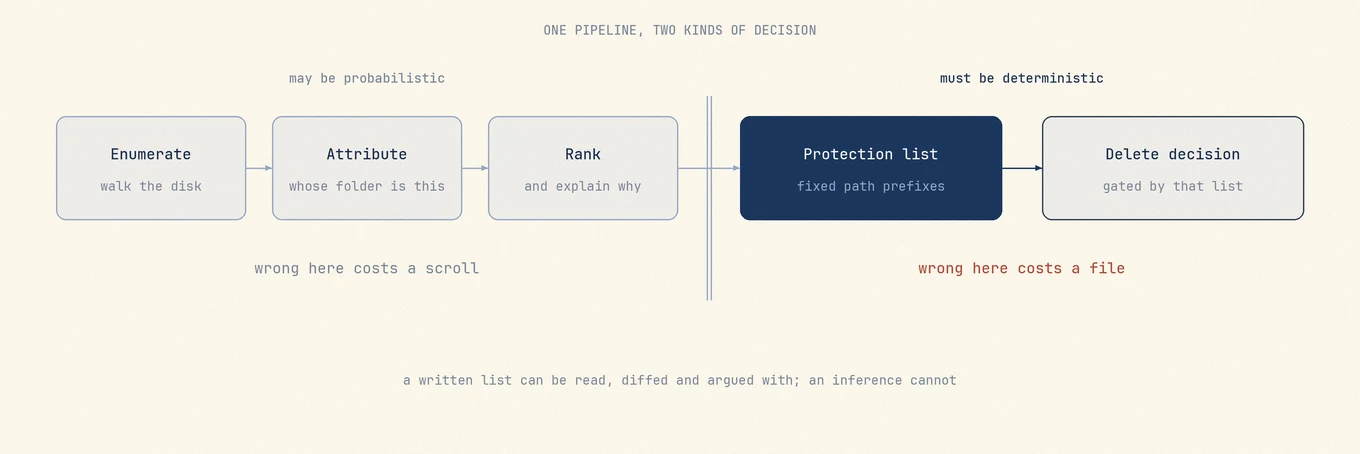
A cleaner that advertises AI is making a claim about one step in a pipeline that has at least four:
- Enumerate. Walk the disk and measure it.
du-shaped work, no judgement in it. - Attribute. Decide which app or toolchain owns each path.
- Rank and explain. Decide which twelve of four thousand candidates deserve a look, and say in a sentence what each one is.
- Decide and delete. Decide what is safe to remove, then remove it.
Steps 2 and 3 are genuinely fuzzy, and a model genuinely helps there. Step 4 is a different kind of problem, and a model is the wrong instrument for it. Almost every argument about AI cleaners is really an argument about which step the vendor means.
Where a model earns its place
Attribution is the honest hard case. Suppose you find
~/Library/Application Support/Foo Labs holding 3 GB with no app called Foo Labs on the
disk. The evidence is weak and scattered: bundle identifier fragments inside the folder's
own plists, a matching prefix in ~/Library/HTTPStorages, a .savedState bundle under
~/Library/Saved Application State, an install receipt in /var/db/receipts. Name
equality fails immediately, because the vendor writes Foo Labs in one place and
com.foolabs.editor in another, and a handwritten catalogue covers the top few hundred
apps then falls off a cliff. This is the exact shape where a model beats a rule: many weak
signals, no decisive one, a long tail nobody will finish cataloguing.
Ranking is the same shape: a scan returning 4,000 paths and 60 GB is a second problem, not
a result. Explanation is easier still, since turning
~/Library/Caches/com.apple.nsurlsessiond into a plain sentence is translation. A tool
using a model for those three jobs, and saying so, advertises a real feature.
Why the last gate has to be deterministic
The delete decision needs three properties a model cannot supply.
Determinism. Same disk, same version, same answer, every time. Temperature zero does not buy this, because the prompt carries your machine's contents: install one more app, the file listing shifts, and the tokens the decision hangs on shift with it. A safety rule that holds on your Mac but not your colleague's is not a safety rule.
Auditability before the fact. A protection list is a set of path prefixes, readable in full in a minute and diffable between two releases. Weights plus a prompt cannot be read as a list of what will be refused, so nothing shows you the boundary before you cross it.
Auditability after the fact. When a deterministic rule deletes the wrong thing you get a reproducible bug: here is the path, here is the line that allowed it, here is the test that now fails. When a model does it, the artifact is a transcript, the fix is a prompt edit, and that edit's effect on every other case is unmeasured.
The failure modes are also asymmetric. A bad ranking costs a scroll; a bad delete of
~/.claude/projects costs every transcript you have. So the frame is not "AI good, AI
bad", it is a split down the middle of the pipeline: probabilistic where being wrong costs
attention, deterministic where being wrong costs data.
Which side Mole is on
Mole ships no model and runs no inference. In ordinary Clean, whether a path can become a deletion
candidate is decided by a fixed array of blocked relative prefixes compiled into the app,
holding entries like .ollama/models, .lmstudio/models, .cache/huggingface,
.cache/torch, .claude/projects, .codex/sessions, .grok/sessions and
Library/Caches/com.apple.e5rt.e5bundlecache. The user-editable half is a plain text file
you can read with cat ~/.config/mole/whitelist. The free
Mole CLI is open source under GPL-3.0. It shares the
user-editable whitelist with the app but has its own built-in checks, which you can inspect.
That last entry is the argument in miniature. com.apple.e5rt.e5bundlecache sits in
~/Library/Caches and the word in its name is "cache", so every heuristic on earth
classifies it as disposable. It holds Apple Neural Engine compiled models, and clearing it
while an app has models loaded breaks recognition calls until the machine restarts. It is
protected because a person hit that failure and wrote the line.
So the practical test for any tool here is one question: which of the four steps does the model perform? Enumeration, attribution, ranking and explanation are credible answers. "It decides what is safe to delete" is an answer to follow by asking to see the list, and if there is no list there is nothing to review.
Most of these boundaries were not thought through on a whiteboard. Someone ran into them on their own Mac, and the rule came later. As this article was written, the Mole CLI GitHub repository had 145 contributors and 987 issues, with 984 closed and 3 still open. That closed count is just GitHub's tracking state, not a claim that 984 bugs were fixed, but it leaves a long trail of where the problem came from, why the rule changed and what should block the same case next time.
Those numbers do not prove every Mac has been tested. macOS and its apps keep changing how they store data, and no one machine can stand in for every other machine. What they show is that Mole's cleanup boundary is continually challenged on real computers, refined and put back into tests, instead of resting on a promise to "be careful."
Mole CLI and Mole for Mac are not the same deletion program. The command-line tool is free
and open source, for people who are willing to read a --dry-run and decide the scope
themselves. The Mac app has its own scanner and deletion chain, with a candidate set that is
the same or narrower. Directories such as node_modules, Pods and venv need a network
connection and the right dependencies to rebuild. They are available for a terminal user to
inspect, but Mole for Mac does not place them in an ordinary cleanup list.
The rules start working before a candidate list reaches the screen. System directories, keychains, Mail, Messages, photos, cloud-drive content, privacy permissions, login items and background tasks do not become candidates because they are large or happen to sit under a directory named Cache. In ordinary Clean, the same applies to Claude, Codex and other AI-tool transcripts, plans, memories and local models. Mole identifies only vetted cache leaves, not a whole application-support directory. If it cannot explain what a directory holds, the default is to leave it alone.
The last step is where the difference matters. A path that looked safe during a scan may be unsafe minutes later: an app might have launched, a build might have started, or a symbolic link might have led somewhere else. Before deletion, Mole checks the original path, protected locations, the user whitelist and the identity of the object again. It also verifies that the owning app or build tool is not using it. Uncertainty produces a skip, not a larger "cleaned" number.
You can still see the consequence of every choice. The review list carries a path, owner and size. An uncertain item can stay unselected or be marked Never Clean. App uninstalls go to Trash; caches delete directly by default to reclaim space, but can be configured to go to Trash. The result separates cleaned, trashed, skipped and failed items, and a local log records what actually happened.
AI can turn a directory into a plain-language explanation and help trace an unfamiliar toolchain. Mole handles the other half: turning those clues into a deletion rule that does not disappear because one answer, one ambiguous directory name or one different Mac changes. It is not trying to delete everything that might be disposable. It is trying to make every deletion explainable, and keep the item when it cannot be sure.
Part two: tools for cleaning up after AI tools
For cleaning up after AI tools, the footprint splits into four kinds of data with four different rules, and conflating them is where accidents happen:
- Tool caches and logs.
~/Library/Caches/claude-cli-nodejs, Cursor's Electron caches, telemetry and debug directories under~/.claude. Regenerable and boring. - Transcripts and project state.
~/.claude/projects,~/.codex/sessions,~/.grok/sessions. Often the largest surprise in a scan, and irreplaceable. - Old CLI versions. Agent CLIs that self-update can leave prior releases behind. As an example, if each copy takes about 300 MB and you confirm only one of five is still needed, the other four account for about 1.2 GB. Check launchers, running processes and pinned versions before deciding which copies to remove.
- Model weights.
~/.ollama/models,~/.cache/huggingface/hub, the LM Studio models directory. Largest by far, owned by the tool that downloaded them.
Measure before picking a tool:
du -sh ~/.claude ~/.codex ~/.ollama/models ~/.cache/huggingface 2>/dev/null | sort -h
Mole, for a reviewed sweep that already knows these paths
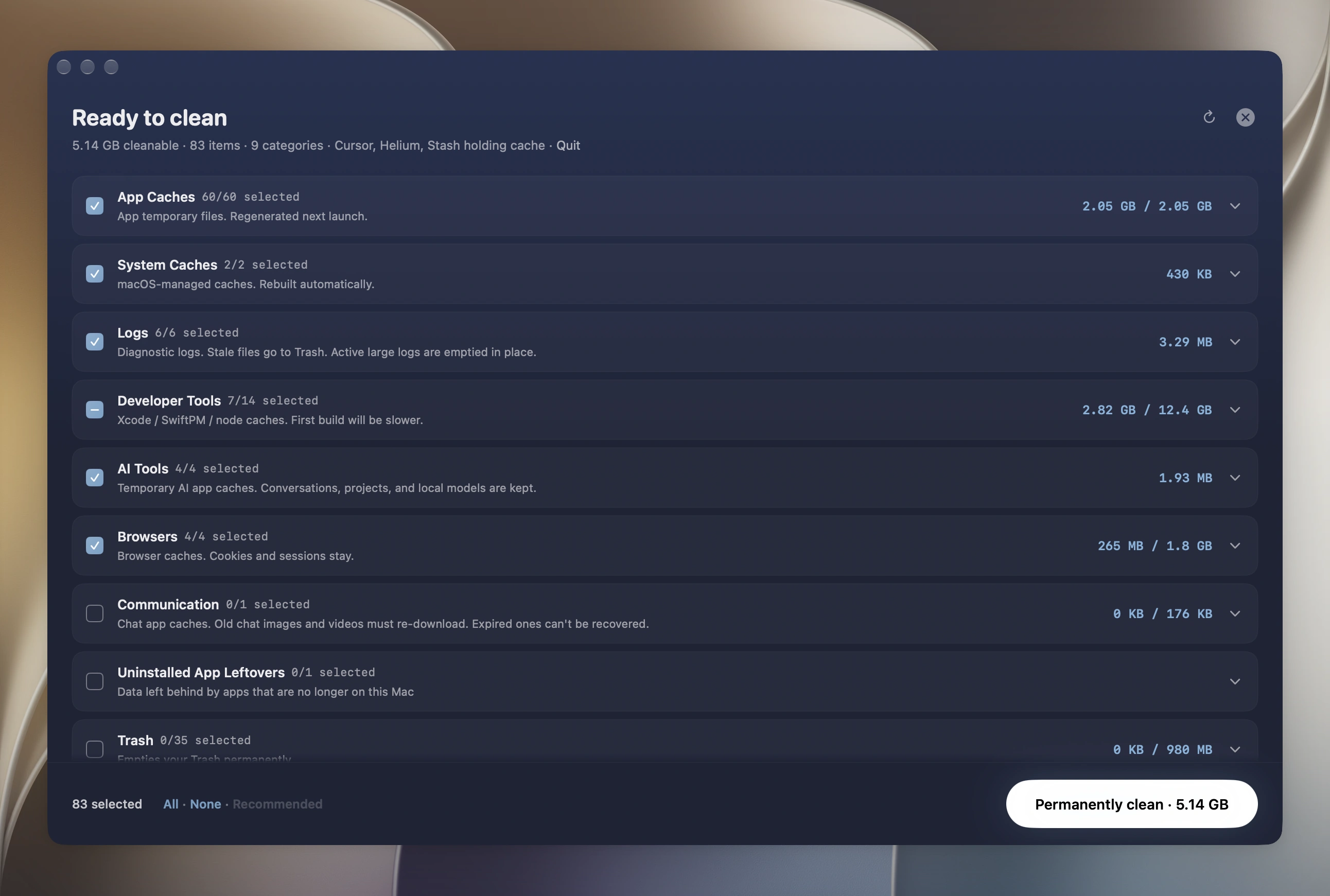
The Clean tool scans first and shows a result you review before anything moves. Every
candidate row carries its exact path, owner and size, and anything the scanner is not
confident about arrives unchecked so the default click is the smaller action. App uninstalls
go to Trash. Caches delete directly by default to reclaim space, but can be configured to go
to Trash. Cleanup actions are recorded locally in ~/Library/Logs/mole/operations.log; the
log distinguishes Trash moves from permanent deletion.
Two behaviours matter specifically for AI tooling. Old agent CLI version directories are
offered after checking the launcher target, not just comparing version numbers. That target
identifies one active path; before removing other copies, check for running processes,
updates and pinned installations that still need them. Keep anything uncertain. Uninstall
checks ownership instead of relying only on name matching, so
removing one app from a vendor does not offer the shared Application Support parent a
still-installed sibling owns.
To run the job: open Clean, let the scan finish, expand the groups that look large, uncheck anything you want to keep, then clean and check the freed space. Scanning is free and each paid tool runs twice for free, so the whole review is verifiable before deciding whether $19 is worth it.
The Mole CLI, when you would rather stay in the terminal
A separate free product, open source under GPL-3.0, installed with brew install mole.
Preview first, always:
mo clean --dry-run
mo purge --dry-run
mo clean handles caches and logs, mo purge targets old project build artifacts, and
clean, uninstall, and optimize support --dry-run so you can preview their actions. It shares
the user whitelist and operations-log location with the Mac app. One difference before you drop
the flag: CLI cache cleanup removes files permanently, while uninstall and leftover removal
still go to the Trash.
cc-cleaner, the open source terminal option built for this problem
cc-cleaner is MIT licensed, Python 3.10 and
later, installable with pipx install cc-cleaner. It ships 22 cleaners including Claude
Code, npm, uv, cargo, Docker, Playwright, browser caches, and an AI/ML models group covering
Hugging Face, PyTorch, Whisper and Ollama. cc-cleaner status prints a size table,
cc-cleaner clean opens an interactive picker, -n is a dry run.
Its risk model is explicit: Safe items clean by default while Moderate and Dangerous items
require --force, and its README puts "conversation transcripts, shared stores" in the
Moderate tier. The source tells you the rest. Its Ollama cleaner removes the whole of
~/.ollama/models as one directory, its Hugging Face cleaner does the same to
~/.cache/huggingface/hub and datasets, and its Claude cleaner offers the *.jsonl
transcripts under ~/.claude/projects. Deletion is shutil.rmtree and Path.unlink, so
nothing lands in the Trash. Its safety layer is a frozen set of forbidden system paths plus
a requirement that every target sit under your home directory: a deterministic list a human
wrote, exactly as it should be. The difference is where the line sits, not rigour.
cc-cleaner puts model stores and transcripts behind a flag; ordinary Clean in Mole refuses them.
DevCleaner, if you want a menu bar app for the same ground
DevCleaner is a macOS 14+ menu bar utility, currently 1.9.0, covering 23 ecosystems from Xcode DerivedData and Gradle to npm and Docker, with dedicated scanners for Claude, ChatGPT, Cursor, Ollama and LM Studio. Safe items are deleted by default, Warning items are "your call", Danger items are never pre-selected, and it keeps a hard deny-list for credentials and session files plus a warning before touching a running app's caches. Core cleanup is free and Pro is sold as a one-time purchase or a yearly subscription; check current numbers on the vendor page. Its site does not say whether removals go to the Trash, which is the thing worth asking before a first run.
MacPaw also ships a CleanMyMac CLI as a public beta, via a Homebrew cask, aimed at the same artifacts. It is proprietary, its repository is an issue tracker rather than source, and its behaviour is explicitly still changing, so read what its confirmation step shows you rather than any published description.
Pointing an agent at your own disk
The last route is to skip cleanup tools and ask Claude Code or a similar agent to clean the disk directly, optionally through one of the published cleanup skills. Its advantage is real and nothing else here has it: an agent can reason about a layout nobody has catalogued, whether that is a framework released last month, a private toolchain, or a home directory arranged the way only you arrange it.
The assessment has to be equally plain. The shell commands are generated at inference time
against your real filesystem, so what runs was never reviewed by anyone before it ran.
There is no dry run unless you demand one. The blast radius is your home directory, and
rm -rf composed from a variable that turned out empty is a failure mode with a long
history. Part one applies with the safety net removed: the decision is probabilistic and
wired straight to the last gate.
Four guardrails cost almost nothing:
- Have it drive a tool with a preview flag instead of composing removals itself. One
public Claude Code skill wraps the
moCLI and makesmo clean --dry-runmandatory beforemo clean, prints the full dry-run output, and requires a typed confirmation. The agent picks the target, a deterministic tool performs the delete. - Never pre-approve
rmin your permission settings. Approve each removal command individually, and read the path rather than the summary of it. - Make the Trash the default. Use Finder or a Trash-aware tool such as Homebrew's
trash. Files still in the Trash can usually be restored, but this is not a backup. A plainmvinto~/.Trashis not equivalent: name collisions can overwrite files. - Bound the working set. Point it at one directory, and ask for
du -shbefore anddf -hafter so the claimed reclaim is measured rather than estimated.
Model stores belong to the tool that downloaded them
No general cleaner should be your instrument here, including the ones above. Ollama and
Hugging Face both keep content-addressed stores where models share blobs, so only the owning
tool knows which blob is still referenced. Use ollama ls and ollama rm <model>, and
hf cache ls with hf cache rm model/<repo> --dry-run. Why deleting blob files by hand
orphans a model is covered in
removing AI tool leftovers.
How they compare
| Tool | Decides deterministically | Previews paths | Recoverable | Protects model stores and chat history | Cost |
|---|---|---|---|---|---|
| Mole for Mac | Fixed blocked-prefix list plus user whitelist | Yes, path, owner and size per row | App uninstalls go to Trash; caches delete by default, configurable to Trash | Yes, never candidates | $19 once, two Macs, free updates |
| Mole CLI | Built-in checks plus the shared user whitelist | Yes, --dry-run for clean, uninstall, and optimize |
Uninstall to Trash, cache cleanup permanent | Built-in exclusions plus the user whitelist | Free, GPL-3.0 |
| cc-cleaner | Frozen forbidden-path set, home-directory bound | Yes, -n dry run and an interactive picker |
No, shutil.rmtree and unlink |
Reachable behind --force, not refused |
Free, MIT |
| DevCleaner | Three risk tiers plus a credentials deny-list | Sizes per scanner, Danger never pre-selected | Not documented, ask before running | Model weights called out as a separate class | Free core, Pro one-time or yearly |
| CleanMyMac CLI | Not published, repository is an issue tracker | Yes, confirmation before removal | Not documented | Not documented | Public beta, check vendor terms |
| Agent with shell access | Nothing, decided at inference time | Only if you demand it | Only if you force the Trash | Only if you say so in the prompt | Your agent subscription |
ollama rm, hf cache rm |
Reference counting inside the store | hf cache rm --dry-run |
No, but re-downloadable | This is the protection | Free |
The boundary, stated plainly
Mole is not malware response, not a backup, and not a substitute for a vendor
uninstaller on software shipping drivers, VPN components or system extensions. It does
not delete model weights, and AI chat history leaves only through AI Cleanup & Care, one
checked session at a time, so if your 200 GB problem is entirely a model library, it
shows you the shape of that library in Analyze and hands the job to Ollama or LM Studio.
Ollama models unused for a month are the exception: AI Cleanup & Care lists them and
removes the ones you check with ollama rm. That is a deliberate boundary, not a gap to
be closed later.
Picking one
200 GB of build output and a dozen toolchains. The volume is in caches, old
node_modules, DerivedData and Docker, not in anything AI-specific. Start with a reviewed
sweep or mo clean --dry-run, then work through
clearing developer caches for the stores needing their
own prune command. cc-cleaner is a good second pass if you read its risk tiers first.
A big local model library. Skip general cleaners for the weights entirely. ollama ls,
hf cache ls and LM Studio's My Models view are the only tools that can free a shared blob
safely. Use a disk map to find the store and the owning tool to change it.
You just noticed Cursor or Claude Code eating disk. Start by separating disposable caches and logs from transcripts and project state. Older CLI versions are candidates only after checking launchers, running processes, updates and pinned versions. Keep transcripts and anything you cannot identify; the step-by-step review is in cleaning up after AI coding tools.
FAQ
Does an AI-powered Mac cleaner delete more safely than a normal one?
Not on the evidence available. A model can beat a rule at deciding which app owns an orphaned folder and at ranking what deserves attention, because those are fuzzy problems with many weak signals. Deciding whether a path is safe to delete needs determinism and an auditable list, neither of which a model provides. Ask a vendor which pipeline step their model runs, and treat "it decides what is safe to delete" as a prompt to see the list.
Is it safe to let Claude Code clean my Mac?
It is the most flexible option and the least bounded one. The commands are generated at
inference time and run against your home directory, with no preview unless you ask for one.
If you do it, make the agent drive a tool that has a dry-run flag rather than composing
rm -rf itself, never pre-approve rm in your permission settings, send removals to the
Trash, and confine it to one directory at a time.
Will a Mac cleaner delete my Ollama models or my Claude Code history?
It depends entirely on the tool, which is why it is the question to ask first. Mole’s ordinary Clean blocks
~/.ollama/models, ~/.lmstudio/models, ~/.cache/huggingface, ~/.claude/projects,
~/.codex/sessions and ~/.grok/sessions at the deletion gate at any age, so they never
become candidates. cc-cleaner classifies model directories and Claude Code transcripts as
Moderate risk and removes them if you pass --force. Read a tool's risk tiers before the
first run rather than after. The one deliberate exception is Mole's AI Cleanup & Care
page, which can list Codex sessions past a window you pick and Claude Code sessions whose
project is gone, unchecked, for you to confirm one by one.
What is actually taking the space after a year of AI coding tools?
Check old CLI versions and transcripts as well as caches. For example, if each version is
about 300 MB and only one of five is still needed, the other four total about 1.2 GB. That is
an illustration, not a measurement of your Mac. Transcripts under ~/.claude/projects can
also grow over time, but unlike caches they may contain irreplaceable work, so exclude them
from a cleanup sweep.
Related reading
- Clean up Ollama and LM Studio models on Mac for the mechanics of content-addressed model stores.
- Clear developer caches without breaking builds for
package manager stores and scattered
node_modules. - Clean up after AI coding tools for the step-by-step version, path by path.