Uninstall Homebrew on Mac with the Official Script
Homebrew ships an official uninstaller, and it does what it says. The surprise is the scope: it removes Homebrew, and it removes what Homebrew installed, and those two facts land differently depending on why you are here.
If you only need disk space, check how much Homebrew uses before removing it. If one formula is misbehaving, uninstalling the whole environment is unnecessary.
Before going any further, write down brew leaves and the cask list. Then run the
official uninstaller with --dry-run and read the scope as if it were a deletion plan.
If one package is the problem, this is the moment to stop and use brew uninstall or
follow the safer Homebrew cleanup path instead.
When you should not uninstall Homebrew
Skip the nuclear option when any of these fit:
- One formula or cask is broken: use
brew uninstall <name>, thenbrew autoremoveif dependencies are orphaned. - You only need space:
brew cleanup -sclears old versions and downloads without deleting the prefix. - You still need
git,node,python, database servers, or CLI tools that came from Homebrew. The uninstaller takes Cellar and Caskroom with it. - You plan to reinstall the same stack tomorrow on the same Mac. Export the lists below, clean with
brew cleanup, and keep the install.
Uninstall when you are leaving Homebrew for good, migrating to a clean prefix after a broken install, or wiping a machine where you no longer want any of those packages.
Know your prefix: Intel, Apple Silicon, and Rosetta leftovers
Homebrew's default prefix depends on the chip:
| Mac | Default prefix | brew binary |
|---|---|---|
| Apple Silicon | /opt/homebrew |
/opt/homebrew/bin/brew |
| Intel | /usr/local |
/usr/local/bin/brew |
Confirm what you actually have before you delete anything:
uname -m
brew --prefix
which brew
arm64 is Apple Silicon. x86_64 is Intel (or a Rosetta terminal). On a migrated Apple Silicon Mac, an old Intel Homebrew under /usr/local can still exist beside /opt/homebrew. The official uninstall script looks for the default for your machine, and on arm64 it also considers /usr/local so a leftover Intel prefix is not missed. If you intentionally keep two prefixes, pass --path so you remove the one you mean.
Do not wipe all of /usr/local by hand on Intel. That directory is shared with other software. Use the official script, which targets Homebrew's own trees.
The official uninstaller
Homebrew's FAQ points to the uninstall script in the Homebrew/install repository. Prefer copying the command from that page if Homebrew ever changes it. The current one-liner is:
/bin/bash -c "$(curl -fsSL https://raw.githubusercontent.com/Homebrew/install/HEAD/uninstall.sh)"
If you want to read the script before it runs, download it first:
curl -O https://raw.githubusercontent.com/Homebrew/install/HEAD/uninstall.sh
less uninstall.sh
/bin/bash uninstall.sh --help
Useful flags:
--dry-run(also-n): print what would be removed and change nothing. Start here on a machine you care about.--path=PATH: uninstall a specific prefix (for example/usr/localon Apple Silicon after a Rosetta-era install).--force: skip the confirmation prompt (also implied whenNONINTERACTIVEis set).--skip-cache-and-logs: leave cache and log directories alone.
Ignore the old mxcl gist and any guide that still says to cd $(brew --prefix) and delete with git ls-files. That flow targeted the early /usr/local layout and is unsafe on modern installs.
What the script actually deletes
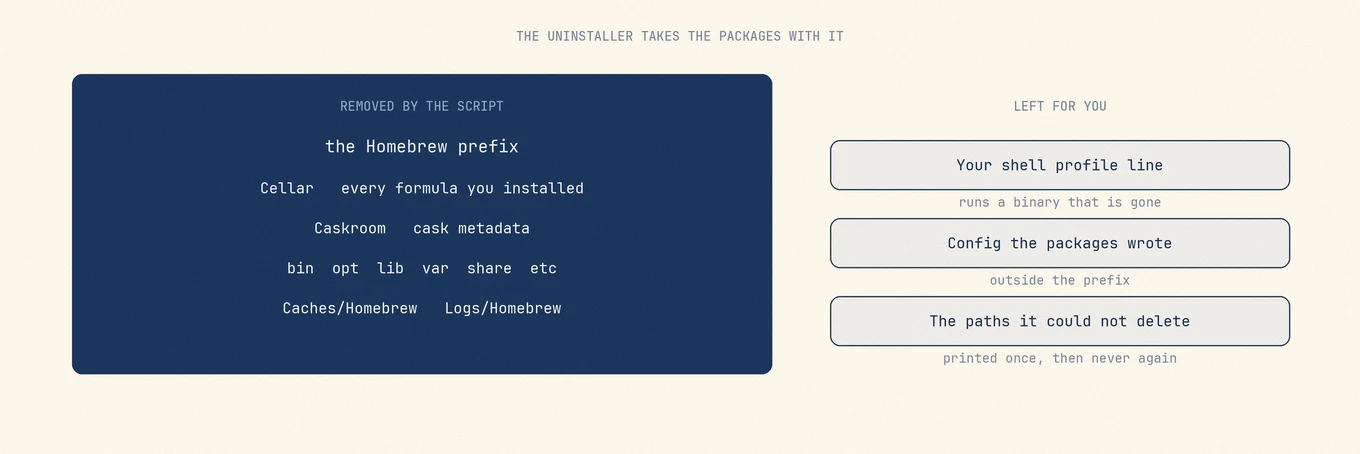
The uninstaller removes the Homebrew prefix and the directories beneath it: bin,
etc, include, lib, opt, sbin, share, var, Frameworks, and both
Cellar and Caskroom.
Those last two are the point. The Cellar is where every formula's files live, and the Caskroom is where cask metadata lives. Removing Homebrew removes them, so every command line tool you installed through it goes at the same time.
It also clears ~/Library/Caches/Homebrew and ~/Library/Logs/Homebrew, the
system-level Homebrew cache, /etc/paths.d/homebrew, and Homebrew-managed apps in
/Applications and ~/Applications.
Write down what you have before you remove it
Export the inventory before uninstalling, using these two commands:
brew leaves > ~/Desktop/brew-formulae.txt
brew list --cask > ~/Desktop/brew-casks.txt
brew leaves lists formulae that no other installed formula or cask depends on.
It is a useful starting list, not a complete record of everything you explicitly installed.
Review these two files before using them to rebuild your setup.
Check package data separately from the package files. Configuration in your home directory
may remain, but a Postgres database under /opt/homebrew/var or /usr/local/var is still inside the Homebrew
prefix. The uninstaller removes var, so data there can go with it. Back up any data you
need outside the prefix before uninstalling. Stop services first if you use them:
brew services list
brew services stop --all
Optional: remove formulae and casks first
If you want a staged teardown instead of one nuclear run, uninstall packages while brew still works:
brew list --formula
brew uninstall --force $(brew list --formula)
brew list --cask
brew uninstall --cask --force $(brew list --cask)
brew autoremove
brew cleanup -s
That empties Cellar and Caskroom but leaves the Homebrew installation. Use it when you are unsure about data under var, or when you want to free package space and keep brew for a smaller set of tools later. When you are done with Homebrew itself, still run the official uninstaller so the prefix, taps, and caches go away cleanly.
Run the uninstall
- Run with
--dry-runand read every path. - Run without
--dry-run, typeywhen asked, and enter your macOS password ifsudois required for protected directories. - Copy any "possible Homebrew files were not deleted" list from the terminal before you close the window.
Example dry-run after downloading the script:
/bin/bash uninstall.sh --dry-run
Or with the remote one-liner, download first so you can pass flags without nesting quotes awkwardly, then run /bin/bash uninstall.sh.
Leftover files checklist
When the script finishes it can print that some possible Homebrew files were not deleted and that you may wish to remove them yourself, followed by the list.
That is the only place those paths are ever named. It usually happens because of permissions on directories Homebrew did not create, and the list is short. Copy it somewhere before closing the terminal, because rerunning the uninstaller on an already-removed install will not produce it again.
Typical leftovers sit under the prefix you just removed:
- Apple Silicon:
/opt/homebrew/etc,share,var,Frameworks, and similar empty or partially owned dirs - Intel: the same names under
/usr/local, but never delete unrelated/usr/localtrees by guesswork
If the script named a path and you confirmed it is Homebrew-only, remove it explicitly (space after -rf):
sudo rm -rf /opt/homebrew/share
Then verify:
ls /opt/homebrew
ls /usr/local/Homebrew
ls ~/Library/Caches/Homebrew
ls ~/Library/Logs/Homebrew
Expect "No such file or directory" once those locations are gone. If /opt/homebrew or a Homebrew-only tree still exists and the script already finished, sudo rm -rf on that path is the usual cleanup. Double-check the path before you press Return.
Package config outside the prefix often remains on purpose: ~/.gitconfig, language version managers, app support folders under ~/Library, and databases you moved out of var. Those are not Homebrew's prefix. Remove them only when you know what they belong to.
Your shell profile still mentions it
The uninstaller does not edit .zprofile, .zshrc, .zshenv, .zlogin, or .bash_profile. The line Homebrew's installer commonly adds looks like:
eval "$(/opt/homebrew/bin/brew shellenv)"
On Intel Macs the default PATH already includes /usr/local/bin, so many installs never needed that line. On Apple Silicon it is required for brew to be found, and after uninstall every new shell tries to run a binary that no longer exists.
Search and remove brew shellenv (and any hand-added /opt/homebrew/bin or /usr/local/bin PATH exports you no longer want):
grep -n "brew shellenv\|/opt/homebrew\|/usr/local/bin" ~/.zprofile ~/.zshrc ~/.zshenv ~/.zlogin ~/.bash_profile ~/.bashrc 2>/dev/null
Open a new terminal tab afterward. If the warning is gone and which brew prints nothing, PATH cleanup is done. Leave the line only if you plan to reinstall immediately.
Common failure modes
Permission denied on leftovers. The script listed paths but could not delete them. Use sudo rm -rf on each named path, with a space between -rf and the path. rm -rf/opt/... fails with illegal option because the path was parsed as flags.
Partial uninstall / "Homebrew is already installed". A previous attempt left .git, Cellar, or bin/brew behind. Run the official uninstall script again with the correct --path, or remove the leftover prefix the script reports, then reinstall from Homebrew's install docs if you still want it.
brew: command not found after a half-finished cleanup. Either uninstall finished and PATH still points at the old prefix (fix the shell line), or brew was removed while packages remain. Do not chase the classic gist. Use the official script with --path if a prefix directory still exists.
Wrong prefix on Apple Silicon. You removed /opt/homebrew but Rosetta-era tools still live under /usr/local. Run the script with --path=/usr/local after confirming that tree is Homebrew's, not a mix of unrelated software.
Services and login items keep calling missing binaries. Stop brew services before uninstall when you can. Afterward, check Login Items and any LaunchAgents that still reference /opt/homebrew or /usr/local/Cellar.
Old blog posts and the 2011 gist. Guides that delete via git ls-files and pbcopy belong to an earlier Homebrew layout. Prefer https://raw.githubusercontent.com/Homebrew/install/HEAD/uninstall.sh only.
Consider whether you want the smaller operation
For a smaller cleanup, brew cleanup removes old versions and cached downloads, brew uninstall <formula> removes one package, and brew autoremove removes unused dependencies. In Mole’s Analyze view, scan the Homebrew folder before cleanup, then scan it again afterward to compare its size. Mole does not automatically track changes made by these commands.
Rebuilding from the exported list
Once Homebrew is installed on the new machine, two commands restore what you had:
xargs brew install < brew-formulae.txt
xargs brew install --cask < brew-casks.txt
They stay separate because casks need --cask, and a mixed list fails on half
its entries.
brew list includes dependencies, so replaying the entire list marks those packages as
explicitly requested and changes what brew autoremove can remove later. brew leaves
avoids much of that, but it is not the same as your requested-package history: a package
you chose may also be required by another package. Review the list and add any tools you
still need before reinstalling.
Mole’s checklist for the separate Homebrew Mac app, including what it leaves for the brew command, is in Uninstall the Homebrew Mac app without removing the brew command.
FAQ
Does uninstalling Homebrew remove all packages it installed?
Yes for anything still inside Cellar and Caskroom. The official script removes the prefix, so formulae and cask metadata go with it. Config and data outside the prefix can remain.
What is the difference between /opt/homebrew and /usr/local?
/opt/homebrew is the default on Apple Silicon. /usr/local is the default on Intel, and it can also hold an old Rosetta Homebrew on a migrated Mac. Always check brew --prefix before deleting.
Should I uninstall every formula before running the uninstall script?
Only if you want a staged cleanup or need to inspect var data first. The script already removes installed packages in the prefix. Export your lists either way if you might reinstall later.
Why do leftover directories remain after uninstall?
Permissions or directories Homebrew did not create can block deletion. The script prints those paths once. Remove them with sudo only when you recognize them as Homebrew leftovers.
Is it safe to delete all of /usr/local?
No. On Intel Macs that folder is shared. Use the official uninstall script, then remove only paths it names if anything remains.
I still see brew shellenv errors in every new terminal. What now?
Remove the eval "$(...brew shellenv)" line from your zsh or bash startup files, then open a new tab. The uninstaller does not edit those files for you.