mdworker High CPU on Mac: When Spotlight Is Stuck

Processes named mds, mds_stores, or mdworker belong to Spotlight metadata and
search indexing. A burst after an update, migration, restore, or large file change is
normal, but mdutil -s alone cannot tell you that a rebuild is active and no fixed
one-hour duration applies. Diagnose the trigger and progress before rebuilding or
excluding data.
The important part is the timing. A burst after an update, migration, restore, or large file change is Spotlight doing expected work. High CPU that returns at idle points to a volume or directory that keeps changing. Killing the workers does not settle that loop; launchd simply starts them again.
What mds and mdworker are
These are the Spotlight indexing engine. mds (metadata server) coordinates the index, mds_stores manages the database, and mdworker processes do the actual scanning of files so their contents and metadata become searchable. When the index is current, they sit idle. When something makes the index stale, they wake up and work through your files, which is the CPU you see.
Why it flares up
Spotlight reindexes when a lot of files change at once:
- After a macOS update or migration, when large parts of the disk are new.
- After moving or copying a large amount of data, such as restoring files or cloning a drive.
- After connecting a new external or network volume that has not been indexed.
- When a folder full of files changes rapidly, like a big download finishing.
Check whether indexing is enabled:
mdutil -s /
"Indexing enabled" is the normal state, not a progress report. Correlate sustained
mdworker CPU with Activity Monitor's disk activity and recent file changes. If work
is advancing, leave the Mac powered and allow it to finish. Large source trees, mail
stores, external volumes, slow storage, and repeated sync churn can extend the job.
When it will not settle
If activity never settles, first stop the app that is rewriting files and disconnect one suspect external volume. Excluding a folder in System Settings › Spotlight > Search Privacy trades lower indexing cost for losing Spotlight results in that folder. Use it for generated build trees, virtual disks, or archives you truly never search, not as a blanket exclusion for Home or the startup disk.
When search results are missing or the index is demonstrably stuck, Apple documents a rebuild through the same privacy list: add the affected disk or folder, wait briefly, then remove it. The current Spotlight rebuild guide calls the button Search Privacy or Spotlight Privacy, depending on the macOS version. Spotlight indexes the item again after you remove it from the list. A rebuild deliberately repeats expensive work, so it is a repair step, not the first response to ordinary CPU activity.
Under the hood: the index, and what forces a rebuild
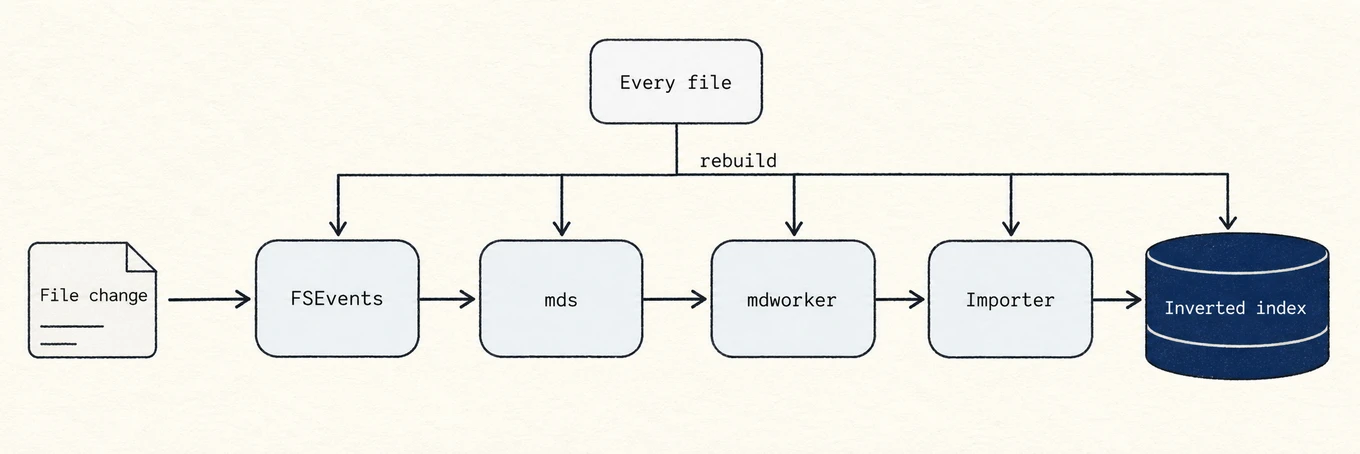
Spotlight keeps an inverted index, a map from words and metadata to the files that
contain them, in a hidden .Spotlight-V100 store on each volume. When a file changes,
the kernel's FSEvents mechanism notifies mds, which hands the file to an mdworker,
which loads the matching importer plugin (.mdimporter) for that file type to pull
out text and metadata. A normal edit is cheap. A full rebuild is expensive because
eligible files must be re-imported. Some updates, migrations, and restores trigger
substantial reindexing, but the scope varies. Privacy exclusions reduce work only by
giving up search for that subtree, which is why they should be narrow and intentional.
Where a monitor helps
Activity Monitor or Mole's Status view can identify Spotlight as the CPU and disk owner. The harder question is whether its work is caused by a finite change or a directory that keeps changing. Recent activity and controlled isolation answer that; force-quitting a worker does not.
A repeatable diagnosis
Confirm indexing is enabled, correlate CPU with disk activity and recent file changes, and wait when progress is plausible. Isolate a repeatedly changing folder or volume when activity persists. Exclude only data you do not need to search; rebuild through Search Privacy only when results or index behavior prove it necessary. Do not kill the workers as a cleanup strategy.