Notes on Building a Quiet Product

Mole for Mac passed a small sales milestone about three weeks after launch. Instead of writing about the numbers, I want to write down a few choices I made along the way, because most of them run against the instincts of a working engineer, and they are the choices I would defend first. If you are building your own product, maybe some of this saves you a detour.
I answer every email myself
Every piece of support since launch has been handled by hand: refunds, activation resets, refunding a price difference after a discount, ordinary questions. The volume is small, well under one percent of users ever write in, and I could have wired up an agent to handle it in half an hour. I chose not to, for two reasons.
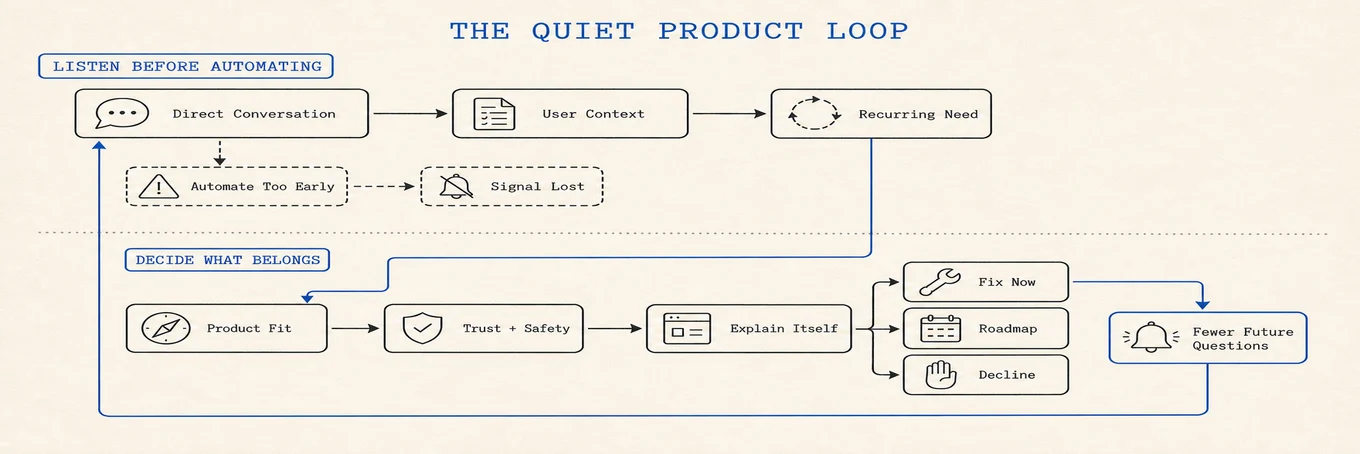
First, support is where the product tells you the truth. A refund request tells you why the product disappointed someone. An awkward question tells you which part of the app fails to explain itself. A few emails back and forth surface what a user actually wanted, which is often not the thing they first asked for. Filter that through automation on day one and you lose the signal exactly when you need it most.
Second, handling every case makes you fluent. After enough rounds you know the best answer to each class of problem, and you know which problems the product should absorb so the question never gets asked again. When the volume grows and I do bring in automation, it will encode that fluency instead of guesswork.
My threshold for automation is not a ticket count. I want the question to repeat, the answer to remain stable, and the exceptions to be understood. Until then, the messy conversation is the research. After that point, automation can handle the known path while making it easy for an unusual case to reach a person.
So far the approach holds up: I have spent nothing on marketing, growth is word of mouth, and the refund rate is under 0.8 percent.
The scaffolding can wait
The same logic applies to infrastructure. I did not set up a ticket system, a help desk, or a knowledge base before launch. Engineers love building the supporting machinery first because it is the part they know how to build, and AI has made it a half-day job, which makes it more tempting and just as easy to prematurely optimize. The half day is real; so is the ongoing cost of tending a system you did not need yet. I would add the system when the absence starts losing requests, hiding response time, or making the same answer inconsistent. Before that, the inbox is simpler and more informative.
Deciding what not to build
The difference between a good product and an average one is mostly the things it declines to do. Which features belong in which release, which requests are real needs and which only sound like them, which genuinely good ideas still do not belong in this product. I have apologized to users who suggested features that were good on their own terms, because a Mac has plenty of nice tricks that Mole should not perform. Say yes to everything and you get a stew, and a stew is hard to maintain and harder to trust with deleting files.
I keep roughly half a year of the product's path in my head: what each version adds, what stays out, and where things land so that a first-time user finds them without instructions. If the common first task needs a manual, the interface has failed the people I most want to reach. Documentation still matters for depth, edge cases, and trust, but it should not rescue the basic shape of the product. The old razor says it best: do not add an entity unless it is necessary.
I now use three vetoes before a feature reaches the roadmap. It should not add an always-on timer, listener, or sampling cost unless the user has entered the feature. It should not widen the privileged helper or ask for a new permission merely to make a small convenience possible. And it should not add a setting when a calm default can make the decision for everyone. These are not universal rules for software. They are a budget for this product: resident work, privilege, and configuration are all forms of surface area that users have to trust forever.
The position
Mole's position is one sentence: a quiet keeper for your Mac. It cleans, uninstalls, optimizes, analyzes, and watches, and otherwise stays out of the way. The ambition is simple to state: if one of every hundred Mac users keeps Mole around, it will have become genuinely useful. Recently some visually impaired users started using it and ran into rough edges, so accessibility fixes moved ahead of new features. I am looking forward to how the app feels for them; a quiet keeper should be quiet for everyone.
Keeping products human in the AI era
AI made much of this product possible. It did not replace talking to the people who use it, and I do not think it should. Efficiency is easy to buy now; the feeling and trust between a developer and their users still has to be earned one conversation at a time. Perhaps that is how products built with AI keep their human warmth: the code can be generated, the relationship cannot.
This is my first paid product, and some of these calls may turn out to be wrong. If you have walked this road longer than I have and see me doing something foolish, I would like to hear it. How Mole got here in the first place is a longer story, told in From a 500-Line Shell Script to a Mac App.