# Why Updating Mac Apps Is Harder Than It Looks
> Update All is a trust and channel decision, not a chore checkbox. Learn when to verify, when to wait, and how batch updates fail together.
Published: 2026-09-07
An Update All button looks like the end of the problem. One click, every outdated icon goes green, and the Mac is "done." In practice an update is a trust decision, a channel decision, and sometimes a rollback decision. Treating every pending row as equally safe is how licenses break, how two copies of the same app appear, and how a half-finished installer leaves you worse than before.
The useful first question is not "is there an update?" It is "who owns this install, and what happens if the replacement fails?"
## Three channels, three contracts
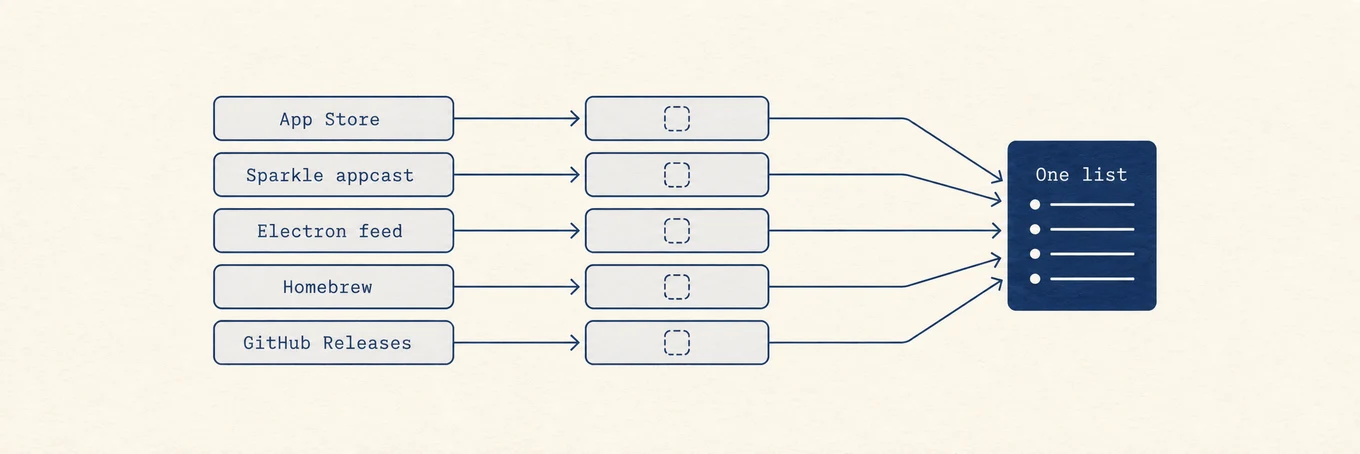
Mac software usually arrives through one of three surfaces. Each one has a different authority for upgrades.
| Channel | Who decides the next version | Typical failure mode |
|---|---|---|
| Mac App Store | Apple's store catalog for that Apple ID | Purchase, family sharing, or a newer macOS requirement blocks the row |
| Developer download (Sparkle, Electron, custom) | The vendor's feed or download page | A mismatched package, a leftover helper, or a silent partial replace |
| Homebrew formula or cask | Homebrew's formula/cask metadata | A self-updater fights Homebrew, or a broad `brew upgrade` moves too much at once |
A fourth surface sits beside them: macOS Software Update. It does not replace Chrome, WhatsApp, or your design tools. Mixing system updates with app updates in one mental bucket is a common source of false confidence.
For the channel-by-channel how-to, see [how to update Mac apps](https://mole.fit/blog/how-to-update-mac-apps). This article is about judgment: when to wait, when to verify, and when a batch update is the wrong shape for the risk.
Updates can share a list while keeping their own sources and installation rules.
## Why "newer" is not always "better today"
Security fixes usually deserve priority. Feature releases and major version jumps do not. Before you approve a row, check three facts:
1. **Release notes for breaking changes.** Plugin hosts, audio tools, IDEs, and anything with signed binaries can invalidate a workflow overnight.
2. **Whether you can roll back.** App Store history, a DMG you kept, a Time Machine snapshot, or a Homebrew pin are real rollback paths. "I will re-download later" is not.
3. **Whether anything else depends on this build.** A pinned CI image, a client project, or a license tied to a build number can make "latest" expensive.
A quiet week before a deadline is a bad time for an opportunistic major upgrade. A quiet weekend after a backup is a better one.
## Blind Update All creates shared failure modes
Batch updates fail in clusters, not as independent coin flips.
| Shared risk | What it looks like | Safer habit |
|---|---|---|
| One blocked purchase stalls the list | A paid App Store update waits on Sign In or Buy, and the rest never start | Separate Store rows from free/verified downloads |
| One bad package poisons confidence | A failed replace leaves a half-updated bundle; you retry everything | Update critical apps one at a time first |
| Wrong channel overwrite | A website DMG lands on a Homebrew- or Store-managed copy | Confirm origin before replacing |
| Incomplete check treated as "no updates" | The UI still scanning looks empty | Wait for the check to finish before deciding |
Vendor feeds also lie in subtle ways. Universal Purchase records, iOS-only version numbers, prerelease channels, and oddly formatted bundle versions have all produced phantom Mac updates. A row that appears every day and never finishes is a signal to inspect, not to click harder.
## Verify before you replace
For a developer-website package, verification is the difference between an update and an untrusted binary:
- Prefer HTTPS download pages you already trust, not a forwarded Discord link.
- Prefer packages the updater signed or checksummed, when the vendor publishes that proof.
- Prefer an in-app updater that replaces the same bundle identifier over a random zip dropped into `/Applications`.
- Prefer quitting the target app cleanly so helpers and lock files are not mid-write.
Homebrew has its own contract: `brew outdated` reviews, `brew upgrade ` applies. Some GUI casks also ship a self-updater. Running both without reading `brew info` is how you get two managers fighting over one `.app`.
## A practical order that keeps risk local
1. Back up, or confirm Time Machine / your usual snapshot is recent.
2. Finish any App Store sign-in or purchase prompts on their own.
3. Update the one or two apps you rely on today, then open them and smoke-test.
4. Run the remaining low-risk updates as a batch.
5. Leave anything with plugins, drivers, or "major" in the version bump for a deliberate window.
If an update fails, stop the batch. Retry that one app, read the vendor note, and only then continue. A cancelled or failed item should not be treated as proof that every other row is unsafe, but it is proof that your attention belongs on the failure first.
## Where Mole fits
Mole's Software Updates list is built to make those decisions visible instead of hiding them behind a single progress bar. App Store and Sparkle-style updates can run together; a pending purchase does not have to hold up the rest; a failed or cancelled row can be retried without forcing every other app through the same path again. Website packages that need an explicit handoff stay explicit, and Mole verifies supported downloads before replacing the installed app when that path is available.
Update All is still a judgment call. Mole's job is to keep the list honest while you make it: origin, progress, and failures stay attached to the app that owns them. For channel commands and Store vs Homebrew details, keep [how to update Mac apps](https://mole.fit/blog/how-to-update-mac-apps) nearby.
## FAQ
### Should I enable every automatic updater?
Automatic updates are reasonable for browsers and other high-risk network clients when you trust the vendor channel. Keep major creative tools, audio plugins, and anything with a pinned project version on manual review.
### Is Homebrew safer than a website DMG?
Neither is universally safer. Homebrew gives you a reviewable formula and a known upgrade command. A vendor DMG can be equally fine when it is signed, documented, and replaces the same app. Problems start when both channels manage the same install.
### Why does an update keep showing after I installed it?
Common causes: the check finished against an old catalog, the on-disk bundle never changed, a helper is still the old build, or the feed is advertising a non-Mac or prerelease build. Confirm the version in the app's About window before retrying.
### Does Mole replace App Store or Homebrew?
No. Mole coordinates discovery and supported install paths; App Store account rules and Homebrew ownership still apply. Use Mole to see what is pending, then let each channel finish under its own contract.
---
Canonical HTML page: https://mole.fit/blog/why-updating-mac-apps-is-harder-than-it-looks
Blog index for agents: https://mole.fit/blog/llms.txt
Site index for agents: https://mole.fit/llms.txt