# What Mac Cleaners Should Never Delete
> Separate regenerable caches from chats, libraries, cloud mirrors, and credentials, and use refusal lists to judge any cleaner.
Published: 2026-07-30 | Updated: 2026-08-22
The useful question about a Mac cleaner is not how many gigabytes it claims to find. It
is what it **refuses** to touch, and whether that refusal is enforced at delete time or
only printed in marketing copy.
macOS already reclaims some caches and thins
[local snapshots](https://mole.fit/blog/how-to-delete-local-time-machine-snapshots-mac) under pressure.
The real risk in third-party cleanup is mis-labeling: chats, mail libraries, project
state, cloud mirrors, and offline models look like large folders to a scanner that only
sorts by size. For whether you need a cleaner at all, start with
[do you need a Mac cleaner](https://mole.fit/blog/do-you-need-a-mac-cleaner).
A trustworthy cleaner refuses to touch chat and mail archives, local AI models, active project state, and cloud-mirrored folders, and that refusal must be enforced in the delete path itself. "Cache" in a folder name is a naming convention, not a safety label.
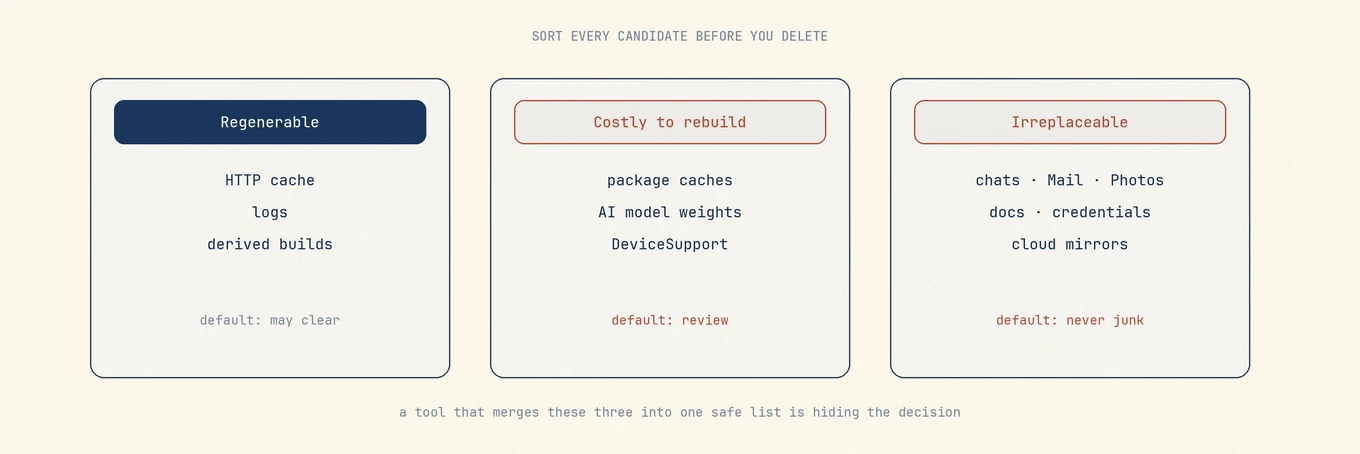
## Sort every candidate into three kinds
| Kind | Examples | Default |
|---|---|---|
| Regenerable | HTTP cache, GPU cache, derived builds, most logs | Clear when owner is quit and path is known |
| Costly to rebuild | Package caches, local AI weights, DeviceSupport | Review; expect time, bandwidth, license prompts |
| Irreplaceable | Messages, Mail, Photos, documents, chats, credentials | Never one-click junk |
A tool that collapses these three into one "safe to remove" list is not simplifying. It
is hiding the decision that should have been yours.
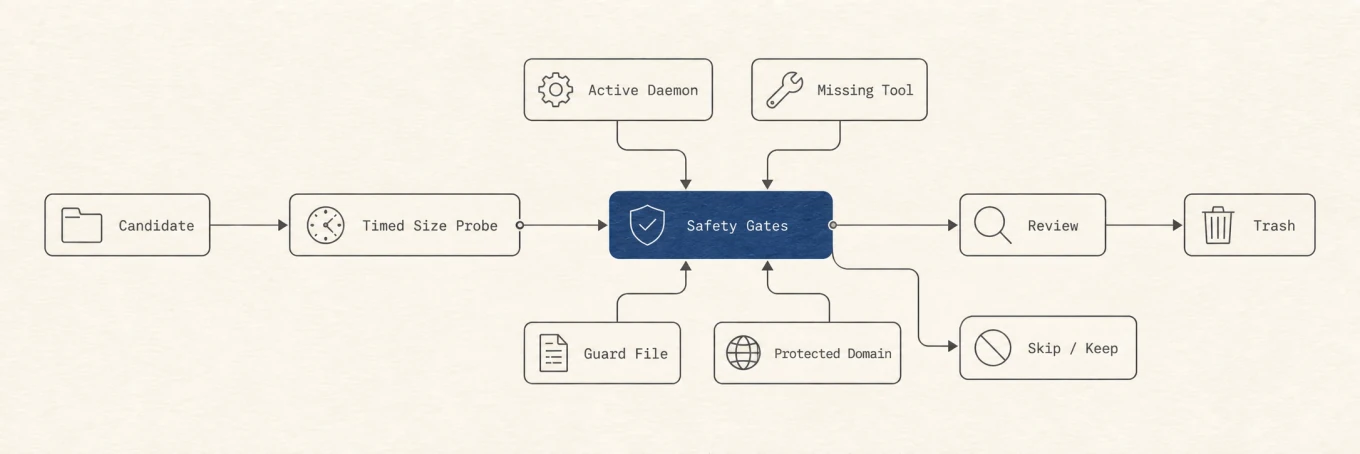
Sort every candidate into regenerable, costly, or irreplaceable before you decide. Defaults differ by column, not by folder name.Safe cleanup is a sequence of gates: identify the owner, classify the data, review the plan, then move only allowed paths to Trash.
## Why "Cache" is not a safety label
On disk, **Cache** is a directory name, not a proof. Real patterns:
- **HTTP and image caches** under browser profiles are usually regenerable (slower first
loads).
- **Code Cache / bytecode caches** rebuild on next launch; cost is CPU time, not data
loss.
- **Clipboard history image stores** can live under a vendor Caches tree and feel like
personal data when cleared.
- **Compiled model / Neural Engine stores** can break recognition until reboot if removed
while consumers run.
- **`tmp` / `Temp` directories** sometimes hold chat checkpoints, unsaved drafts, or
installer state. A path named tmp is not automatically temporary.
Before deleting anything named cache, ask three questions:
1. Who writes it?
2. Who reads it after reboot?
3. What is the recovery path if I am wrong?
If you cannot answer all three, leave it.
## Never treat these as junk
### Personal libraries and communications
- Photos library packages and internal databases
- Mail data, envelope indexes, and attachments
- Messages databases and attachments (including with Messages in iCloud)
- Notes, Voice Memos, and similar personal stores
- AI **chat transcripts** and project histories (`sessions`, `file-history`, agent
project trees)
Caches regenerate. Deleted conversations and libraries do not. Prefer export and the
owning app's retention controls over any bulk cleaner. Related:
[Messages storage](https://mole.fit/blog/how-to-clear-messages-storage-mac),
[Mail storage](https://mole.fit/blog/how-to-reduce-mail-storage-mac),
[Photos storage](https://mole.fit/blog/how-to-free-up-photos-storage-mac).
### Documents, cloud mirrors, and synced trees
- Documents, Desktop, and project roots
- iCloud Drive / Mobile Documents: a local delete can propagate
- `~/Library/CloudStorage/…` provider folders: assume multi-device effect
A cleaner that surfaces cloud paths without a clear "this syncs" marker is incomplete. A
cleaner that default-selects them is unsafe.
### Credentials, privacy, and system policy
- Keychains, browser login databases, token stores
- TCC databases and privacy permission state
- Configuration profiles, MDM payloads, security-agent state
- Wallpaper and system media caches that blank Settings UI for almost no reclaim
### Running-owner and install-in-progress state
- Caches for an open app or mid-update staging
- Staged **macOS install** payloads the boot process may still expect
- Live package-manager stores while a build or `brew` run is active
### Shared containers and multi-app vendors
- Group containers shared across a suite
- Vendor parent folders when any product from that vendor remains
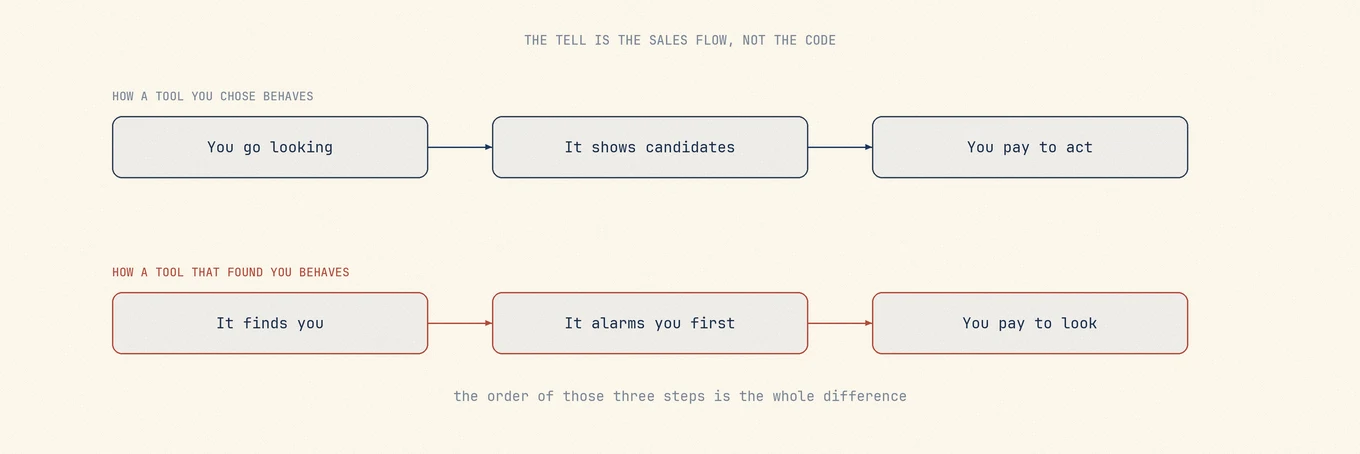
Trust the sales flow: a tool you chose shows candidates first; a tool that found you often alarms first and sells the view.
## Names that look disposable but often are not
| Looks like junk | Often actually is |
|---|---|
| `Library/Application Support/…` | App databases, offline packs, license state |
| `Containers/…` | Full sandboxed home for the app |
| `Group Containers/…` | Shared suite data |
| Product-named `Caches/…` | Clipboard history, model caches, site data |
| `…/tmp` or `…/Temp` | Checkpoints, drafts, installer state |
| Large `.db` / `.sqlite` | Primary user data |
| `node_modules`, `Pods`, `.venv` | Rebuildable only with network and correct lockfiles |
Developer stores need their own rules
([dev caches](https://mole.fit/blog/how-to-clear-dev-caches-mac),
[AI models](https://mole.fit/blog/how-to-remove-ai-tool-leftovers-mac)).
Browser profile bulk is covered in
[browser storage](https://mole.fit/blog/how-to-free-up-browser-storage-mac).
## What enforcement looks like (not just UI copy)
A trustworthy cleaner implements safety in **layers**:
1. **Scanner supply:** never list blocked classes as candidates.
2. **Default selection:** review-only rows start unchecked.
3. **Path validation at delete time:** re-check identity, symlinks, and allowlists even
if the UI already showed the path. Time-of-check versus time-of-use matters when apps
launch during review.
4. **Recoverable sink:** ordinary user-file deletes go to Trash, not silent `rm`.
5. **Result accounting:** reclaimed / skipped / failed separately; missing paths are not
"success."
Warnings without enforcement are decoration. Prefer tools that fail closed (miss a
candidate) over tools that fail open (delete unknown data).
### A practical test you can run on any tool
1. Point it at a machine with two products from the same vendor.
2. Uninstall only one.
3. See whether the tool proposes the shared Application Support parent or a group
container both still need.
4. Decline anything shared; note whether the tool explains *why* an item is selected.
If it cannot explain ownership in plain language, do not let it batch-delete.
## Permissions are part of the contract
**Full Disk Access** lets a process read protected Library paths. It does not make every
readable path deletable. **Privileged helpers** should be narrow, versioned, and scoped
to fixed operations, not a general root shell. Ask:
- Which features need FDA, Automation, or a helper?
- Does monitoring require always-on sampling?
- Can you revoke access and still use the non-destructive parts?
## How Mole draws the line
[Mole](https://mole.fit/) applies this boundary by keeping discovery separate from deletion and by
defaulting ambiguous or shared data out of the removal set:
- Regenerable caches and logs can appear; personal libraries do not.
- AI **chat history is never a clean candidate**; model stores stay with Ollama, LM
Studio, or Hugging Face rather than a generic junk list.
- Browser profile data and many package caches are review-only or default-unchecked.
- Cloud-synced paths are marked so a local delete is informed.
- Uninstall remnants are attributed by identity; shared group data stays protected
without an explicit owner-scoped path.
- Results separate reclaimed, skipped, and failed bytes.
That boundary is a product decision. When macOS or an app layout changes, the safe
failure mode is to **miss** a candidate, not to delete unknown data.
## Common mistakes
**Equating large with junk.** Size is a ranking signal, not a safety signal.
**Clearing "everything named cache" on a schedule.** Healthy caches return as I/O and
slower launches.
**Paying to see what would be deleted.** Honest tools show candidates first.
**Trusting a single success number** that folds skipped and missing paths into
"cleaned."
## A practical rule
If you cannot explain what the file is for, who owns it, and how you would restore it,
do not delete it with a cleaner. Use a
[disk map](https://mole.fit/blog/how-to-find-large-files-on-mac) to locate weight, the owning app to
clear its own cache, and Trash for anything you might regret.
## Order of decisions
1. Name the problem (full disk, broken app, leftover after uninstall).
2. Classify the data kind (regenerable / costly / irreplaceable).
3. Prefer the owning app's cleanup UI when it exists.
4. Review exact paths; default-off for costly and shared.
5. Delete to Trash; re-test the app and siblings.
6. Empty Trash only after you accept the result.
## Further reading
- Apple Platform Security: [Signed system volume security](https://support.apple.com/guide/security/signed-system-volume-security-secd698747c9/web)
- Apple: [Control access to files and folders](https://support.apple.com/guide/mac-help/control-access-to-files-and-folders-on-mac-mchld5a35146/mac)
- [Do you need a Mac cleaner](https://mole.fit/blog/do-you-need-a-mac-cleaner)
- [Clear caches safely](https://mole.fit/blog/how-to-clear-cache-on-mac)
- [Leftovers after uninstall](https://mole.fit/blog/how-to-remove-leftover-files-after-uninstalling-mac-apps)
- [Free Mac cleanup tools](https://mole.fit/blog/free-mac-cleanup-tools)
A cleaner earns trust by the list of things it will not touch as much as by the list it
will.
## How scareware cleaners talk
None of these lines is evidence on its own:
- "Serious problems detected," with no path attached.
- "Free up 50 GB," with no account of how that number was measured.
- An alarm first, then a paywall before you can see what it found.
- Ordinary caches described as a virus or as system damage.
A more trustworthy flow lists candidates and their exact paths first, deletes only
after you confirm, and sends ordinary deletes to the Trash.
## Damage control after a wrong delete
If something is already gone and still sits in the Trash:
1. Stop the cleanup run before it removes anything else.
2. Put the item back from the Trash.
3. Open the owning app and confirm the data is intact, not just that the file exists.
4. If the Trash is already empty, check Time Machine or whatever other backup you keep.
5. For cloud-synced paths, check your other devices too; the delete may have propagated
already.
With no backup, professional recovery is not a guarantee. That is exactly why
irreplaceable data should never be in a one-click list to begin with.
## An extra boundary for developers
On a development machine `node_modules`, `Pods`, `.build`, and `DerivedData` look like
junk, and their rebuild cost is real network and real time. Downloadable again is not
the same as safe to tick by default; the specific boundaries are in
[dev caches](https://mole.fit/blog/how-to-clear-dev-caches-mac).
AI session directories do not belong in the candidate list even when they are small. A
conversation does not regenerate; a cache does.
## FAQ
### Is everything with "cache" in its name safe to delete?
No. Some apps store user data under cache-like names, and some caches take hours to rebuild. Safety comes from knowing what the folder holds and who wrote it, never from the word in its name.
### How can I tell whether a cleaner actually protects my data?
Look for enforcement, not promises: a protected-items list the delete path refuses to cross, a review screen before anything is removed, and deletion that goes to the Trash so mistakes are recoverable.
### What should I do if a cleaner already deleted something important?
Check the Trash first; a review-first tool sends removals there. Server-synced data such as chat or mail usually re-downloads after a resync, but local-only data may be gone, which is exactly why review-before-delete matters.
---
Canonical HTML page: https://mole.fit/blog/what-mac-cleaners-should-never-delete
Blog index for agents: https://mole.fit/blog/llms.txt
Site index for agents: https://mole.fit/llms.txt