# Uninstall Homebrew Without Losing Your Package List
> The official script takes the Cellar and Caskroom with it, so export the formula inventory first and keep the paths it reports it could not delete.
Published: 2026-08-04 | Updated: 2026-08-08
Homebrew ships an official uninstaller, and it does what it says. The surprise is the
scope: it removes Homebrew, and it removes what Homebrew installed, and those two facts
land differently depending on why you are here.
If you came to reclaim disk space, this is the largest single reclaim on most developer
Macs. If you came because one formula misbehaves, this is far more than you wanted.
## The official uninstaller
```
/bin/bash -c "$(curl -fsSL https://raw.githubusercontent.com/Homebrew/install/HEAD/uninstall.sh)"
```
Read it before running it. The script is short and it is the authoritative description
of what is about to happen, which is more than any article can claim.
It supports `--dry-run`, and on a machine you care about that is the correct first
invocation: it prints what would be deleted and changes nothing.
## What the script actually deletes
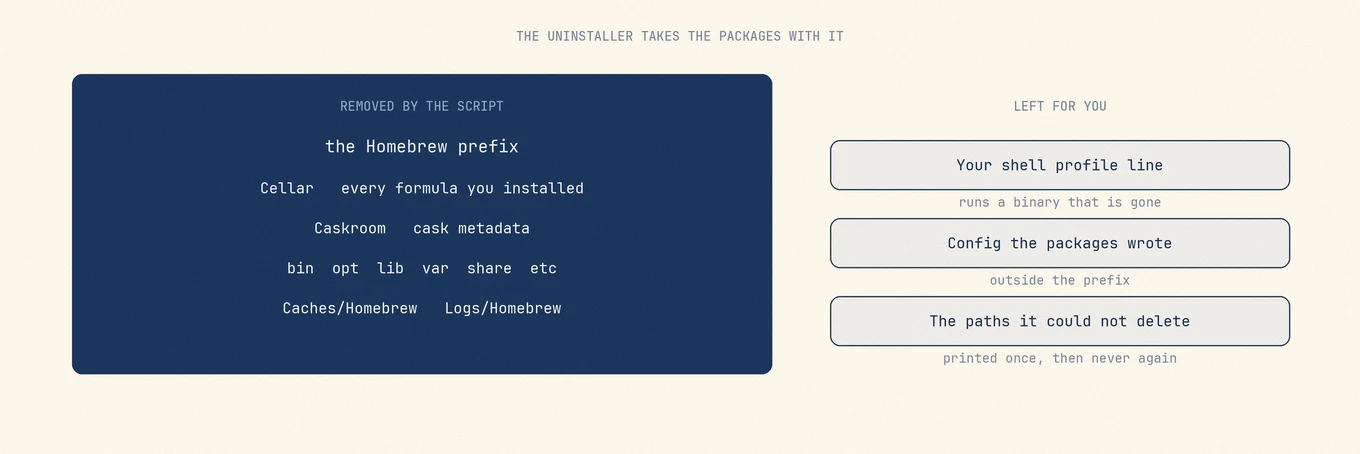
The uninstaller removes the Homebrew prefix and the directories beneath it: `bin`,
`etc`, `include`, `lib`, `opt`, `sbin`, `share`, `var`, `Frameworks`, and both
`Cellar` and `Caskroom`.
Those last two are the point. The Cellar is where every formula's files live, and the
Caskroom is where cask metadata lives. Removing Homebrew removes them, so every command
line tool you installed through it goes at the same time.
It also clears `~/Library/Caches/Homebrew` and `~/Library/Logs/Homebrew`, the
system-level Homebrew cache, `/etc/paths.d/homebrew`, and Homebrew-managed apps in
`/Applications` and `~/Applications`.
The script takes the packages with it, not just the package manager. What it leaves is the configuration those packages wrote and the lines you added to your shell profile.
## Write down what you have before you remove it
The inventory is not recoverable afterwards, and it is one command:
```
brew leaves > ~/Desktop/brew-formulae.txt
brew list --cask > ~/Desktop/brew-casks.txt
```
`brew leaves` lists the formulae you asked for rather than every dependency pulled in
behind them, which is the list you actually want when rebuilding. On a new machine those
two files turn a day of remembering into one `brew install` line.
Anything a package stored outside its own directory survives and is worth keeping: a
Postgres data directory, a local database under `/opt/homebrew/var`, config in your home
directory. The uninstaller removes `var` under the prefix, so a database that lives there
goes with it. Copy it out first if it matters.
## The message at the end that people scroll past
When the script finishes it can print that some possible Homebrew files were not deleted
and that you may wish to remove them yourself, followed by the list.
That is the only place those paths are ever named. It usually happens because of
permissions on directories Homebrew did not create, and the list is short. Copy it
somewhere before closing the terminal, because rerunning the uninstaller on an
already-removed install will not produce it again.
## Your shell profile still mentions it
The uninstaller does not edit `.zprofile`, `.zshrc`, or `.bash_profile`. The `eval
"$(/opt/homebrew/bin/brew shellenv)"` line you added at install time stays, and every new
shell then tries to run a binary that no longer exists.
It is harmless and it is noisy. Remove the line, or leave it if you plan to reinstall.
## Consider whether you want the smaller operation
Most reasons to uninstall Homebrew are better served by something narrower. `brew
cleanup` reclaims old versions and cached downloads. `brew uninstall ` removes
one thing. `brew autoremove` drops dependencies nothing needs anymore. Whichever you
run, [Mole](https://mole.fit/) will show you what the prefix weighs before and after, which is the
number that decides whether the full removal was ever necessary.
## Rebuilding from the exported list
Once Homebrew is installed on the new machine, two commands restore what you had:
```
xargs brew install < brew-formulae.txt
xargs brew install --cask < brew-casks.txt
```
They stay separate because casks need `--cask`, and a mixed list fails on half
its entries.
`brew leaves` rather than `brew list` is what makes this work. `brew list`
includes dependencies, so replaying it explicitly installs hundreds of packages
that should have arrived on their own, and `brew autoremove` will no longer touch
them afterwards because you asked for them by name. `brew leaves` returns only
what you actually installed and leaves the dependency graph to Homebrew.
---
Canonical HTML page: https://mole.fit/blog/how-to-uninstall-homebrew-mac
Blog index for agents: https://mole.fit/blog/llms.txt
Site index for agents: https://mole.fit/llms.txt