# What Is ~/Library/Caches on Mac? What Is Safe to Delete?
> Distinguish cache from state and user data, measure the owner, use its cleanup interface, and verify the app before emptying Trash.
Published: 2026-06-17 | Updated: 2026-08-22
A folder named Caches is a clue, not proof that everything inside can be deleted. A
true cache is a replaceable copy of something that still exists elsewhere: a remote
file, an original document, a compiled artifact, or data the owning app can recreate.
If the source is gone, encrypted, or unique to this Mac, the folder is not disposable
no matter what its parent is called.
Apple's
[Library directory guidance](https://developer.apple.com/library/archive/documentation/FileManagement/Conceptual/FileSystemProgrammingGuide/MacOSXDirectories/MacOSXDirectories.html)
draws the useful boundary. Cache data can be regenerated and an app should not depend
on its continued existence. Application Support has a different contract and can
contain user data or resources the app needs. Treating every large Library folder as
temporary is how logins, offline work, databases, and downloaded models disappear.
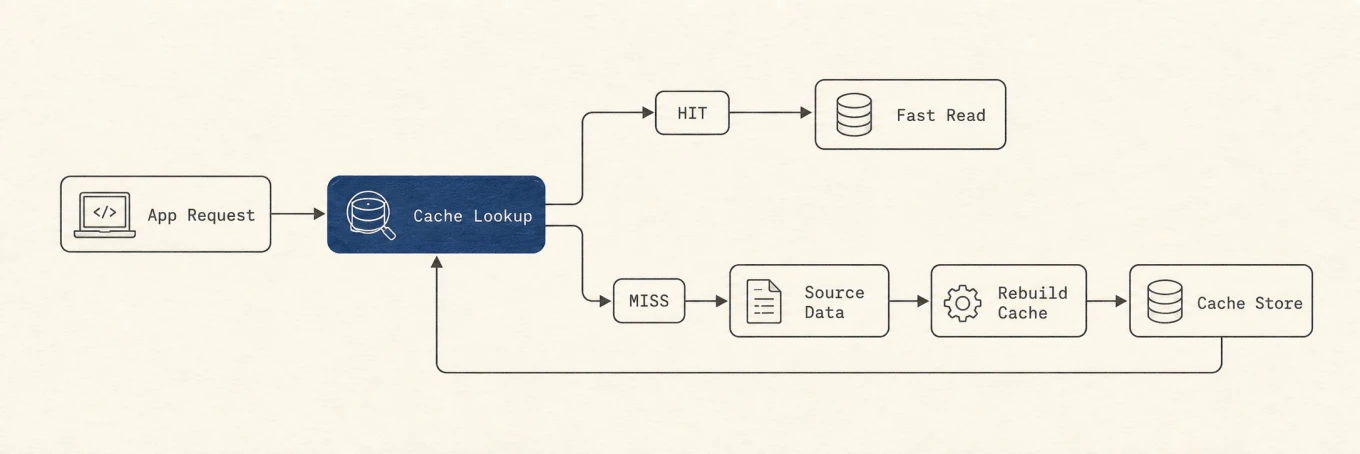
A cache hit returns immediately. A miss fetches source data, rebuilds the disposable copy, and stores it for the next request.
On a cache hit, the app reads the local copy and continues. On a miss, it returns to
the source, rebuilds the copy, and may store it again. If you cannot name that source,
you cannot know whether a miss is recoverable.
## `~/Library/Caches` and `/Library/Caches` have different scopes
The tilde matters:
- `~/Library/Caches` belongs to the current user. Apps commonly keep a child folder
named after their bundle identifier, such as `com.example.MyApp`.
- `/Library/Caches` is in the Mac's local Library. Its contents can serve system-wide
software or more than one user and often have different ownership.
Apple documents the bundle-identifier convention, but a familiar name is not a safety
certificate. An app can keep a cache database, session state, and downloads next to
one another. Sandboxed apps can also keep related material inside Containers rather
than the top-level user Caches directory.
Never recursively delete either Caches root. `~/Library/Caches` is a mixed
neighborhood containing browsers, developer tools, sync clients, and helpers.
`/Library/Caches` has a wider impact. If an item there refuses inspection because of
permissions, stop. A permission error is not a reason to add `sudo` to a generic
cleanup command. Start with the owning software's controls or Apple's guidance.
Anything under `/System` is outside this cleanup surface. Apple's
[file system overview](https://developer.apple.com/library/archive/documentation/FileManagement/Conceptual/FileSystemProgrammingGuide/FileSystemOverview/FileSystemOverview.html)
reserves `/System/Library` for Apple.
## Classify the contents before deciding
Four kinds of files often sit close together. Their default actions are different.
| Kind | Clues | What deletion can cost | Default action |
| --- | --- | --- | --- |
| Cache | Thumbnails, compiled output, downloaded copies with a known source | Time, CPU, battery, and network while the owner rebuilds | Review, then use the owner's cleanup interface |
| State or session | Open tabs, window restore, cookies, drafts, tokens | Signed-in sessions, restore points, unsaved work, offline continuity | Keep unless the owner offers a specific reset |
| Database or index | `.db`, `.sqlite`, `Index`, encrypted or content-addressed stores | Search history, offline records, references, or the authoritative local copy | Keep unless the owner explicitly documents safe rebuilding |
| User data | Documents, photos, mail, chats, profiles, credentials, model weights | Permanent loss or a large re-download of material chosen for offline use | Never treat as generic cache |
The database row needs particular care. An index can be disposable, but the same file
shape can be the only local copy of mail, notes, or site data. An encrypted index does
not reveal which records remain referenced. If the owner does not document a prune or
reset operation, leave it.
Application Support, Containers, Group Containers, preferences, keychains, and hidden
tool directories follow the state or user-data rule until their owner proves a
specific child is rebuildable. A cache-like name inside those trees does not change
the recovery contract.
## Measure the large owners first
Start with a size listing, not a delete:
```bash
du -sh ~/Library/Caches/* 2>/dev/null | sort -h
du -sh /Library/Caches/* 2>/dev/null | sort -h
```
Read from the bottom. The last few lines are the largest children. Match each one to
an app, bundle identifier, or documented tool cache. If the owner is unclear, stop
there. A 50 MB cache with a clear owner is safer to evaluate than a 20 GB opaque
directory.
These numbers are measurements, not promises about recoverable space. Files can stay
open, APFS can share blocks through clones and snapshots, and Finder, `du`, and System
Settings group storage differently. Apple's
[Mac storage guide](https://support.apple.com/102624) describes System Data as
the broad remainder for Apple and third-party files that do not belong to a more
specific category. That label is not a directory and should not be used as a deletion
target.
## Ask five questions before deletion
1. **Who owns this folder?** Identify the app, command-line tool, bundle identifier,
or system service. Similar names are not enough.
2. **Can the owner rebuild it, and from which source?** Name the remote artifact,
original file, or deterministic build input. "The app probably recreates it" is
not evidence.
3. **What does a cache miss cost?** Rebuilding may take hours of compilation, battery,
and network traffic, or remove offline availability until a download completes.
4. **Is the owner active?** Quit the app and check related downloaders, package
managers, model servers, or background helpers. Removing an open or memory-mapped
database can leave it inconsistent.
5. **What is the recovery path?** Prefer an owner-provided command with preview. For a
narrowly identified manual removal, keep the item in Trash until the app has been
tested.
An unknown answer means keep the folder. The goal is not to force every candidate
through a cleanup; it is to find the few candidates with a complete recovery story.
## Prefer the owner's cleanup interface
The owner understands references, shared blobs, active versions, and files that look
old but remain required. Its interface can remove less and recover more safely than a
recursive filesystem command.
### Browsers
Chrome's
[Delete browsing data](https://support.google.com/chrome/answer/2392709?hl=en-uk)
separates cached images and files from cookies, site data, history, passwords, site
settings, and offline hosted-app data. Choose only **Cached images and files** when
the goal is cache recovery. Clearing cookies or site data can sign you out and remove
offline state. Deleting signed-in browsing data can also affect synced information.
Other browsers make similar distinctions even when their labels differ. Use the
browser's storage or privacy controls and read every selected category. Do not delete
the browser profile folder to clear a page cache.
### Developer tools
Developer caches can be large because they trade disk space for faster builds and
installs. The command needs to match the owner.
Homebrew documents `brew cleanup --dry-run` as a preview of stale downloads and old
installed versions, followed by `brew cleanup` if the plan is correct. Use that
[documented cleanup](https://docs.brew.sh/Manpage.html#cleanup-options-formulacask-)
instead of deleting Homebrew's cache root. A preview also shows when the expected
savings come from an installed version rather than a download.
npm describes its cache as self-healing. Start with:
```bash
npm cache verify
```
The command checks integrity and garbage-collects unneeded content. npm's
[cache documentation](https://docs.npmjs.com/cli/v11/commands/npm-cache/)
says a forced clean is generally unnecessary except for deliberate space recovery.
Do not make `npm cache clean --force` a routine maintenance step.
Xcode Derived Data can be rebuilt, but rebuilding it can consume substantial time and
energy. Quit Xcode, target the project you actually intend to rebuild, and use Xcode's
own clean or settings surfaces where possible. Package repositories, signing assets,
simulator data, and source checkouts are not Derived Data just because they belong to
a developer tool.
### AI tools and downloaded models
AI directories often combine caches with models, chat history, credentials, sessions,
and indexes. Those categories need explicit selection.
Hugging Face provides `hf cache ls` to inventory repositories and revisions. It also
supports a dry run for selected removal and a prune command for detached revisions:
```bash
hf cache ls
hf cache rm model/example --dry-run
hf cache prune --dry-run
```
Use the current
[Hugging Face cache commands](https://huggingface.co/docs/huggingface_hub/main/en/guides/cli#hf-cache)
instead of deleting content-addressed blobs by hand. Shared files and revision
references make raw folder size a poor guide to what is unreferenced.
Ollama exposes a model inventory and a selected removal command:
```bash
ollama ls
ollama rm
```
Those commands come from Ollama's
[CLI reference](https://github.com/ollama/ollama/blob/main/docs/cli.mdx). A model is
deliberately downloaded content, not a generic cache. Removing it trades storage for
the time and bandwidth required to fetch it again. Never clear model directories,
conversation history, credentials, profiles, or active databases merely because they
sit under a hidden tool folder.
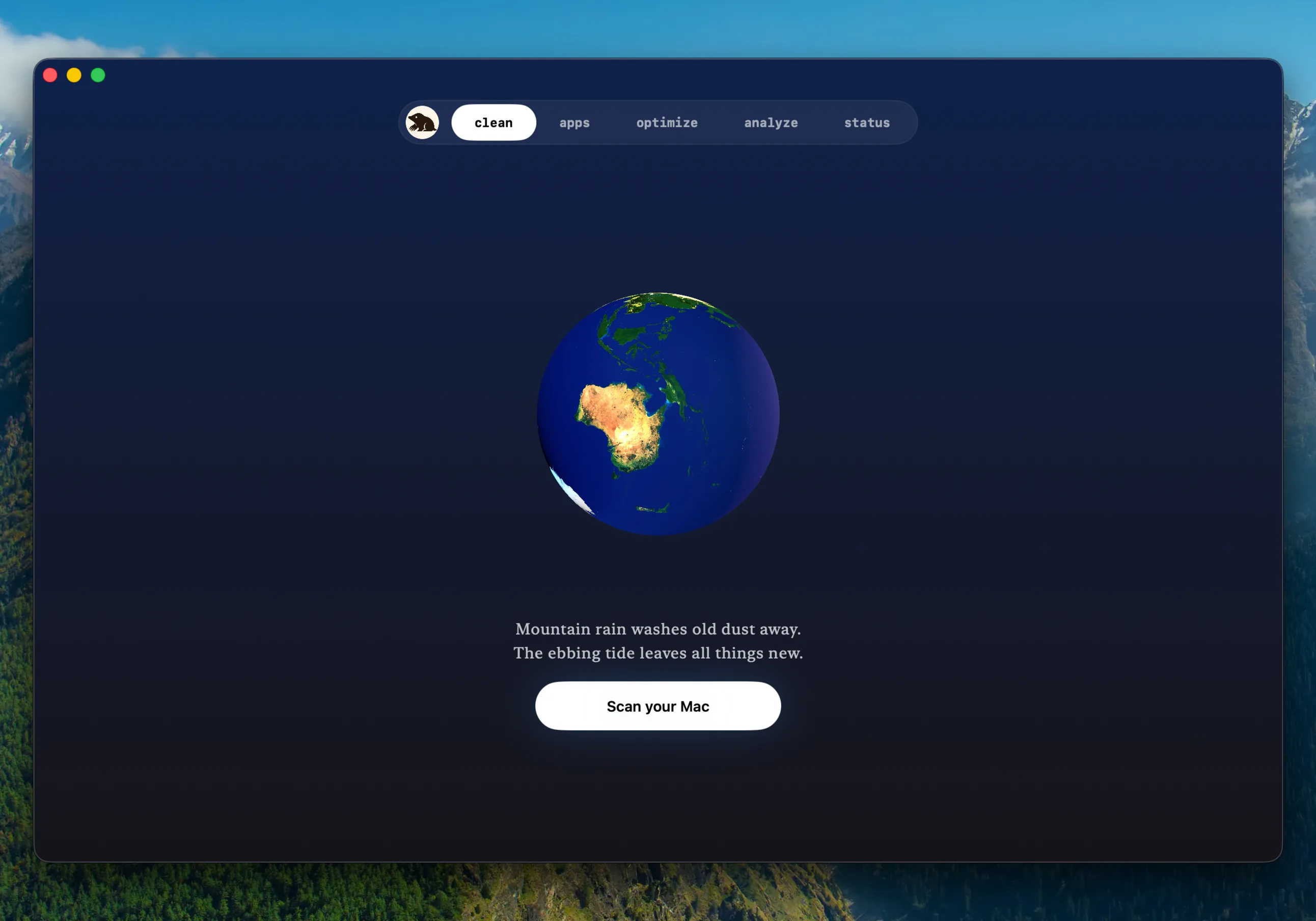
After a reviewed sweep, the completion screen shows the space actually reclaimed, not an estimate. This is Mole's Clean view.
A cleanup tool should show the owner, path, size, and category before taking action.
It should also exclude documents, profiles, conversations, model stores, and unknown
Application Support data. [Mole](https://mole.fit/)'s Clean view follows that review-first shape. The
important property is the safety boundary, not the number of items found.
## If manual removal is still necessary
Manual removal belongs at the end of the process, after the owner has no suitable
interface and the folder has a complete answer to all five questions.
1. Quit the owning app and any related background process.
2. Move one narrowly identified cache child to Trash. Do not move either Caches root.
3. Reopen the app and repeat the task that used the cache.
4. Verify documents, logins, offline data, preferences, and any build or model the app
should still know about.
5. Check actual available storage, then empty Trash only after the app passes those
checks.
Apple's [Mac storage guide](https://support.apple.com/102624) notes that moving
a file to Trash does not make its space available until Trash is emptied. That delay
is useful here because it keeps a recovery window. Owner
commands such as Homebrew, npm, Hugging Face, or Ollama may delete directly, so do not
assume their results can be restored from Trash. Their preview and selection controls
are the recovery boundary.
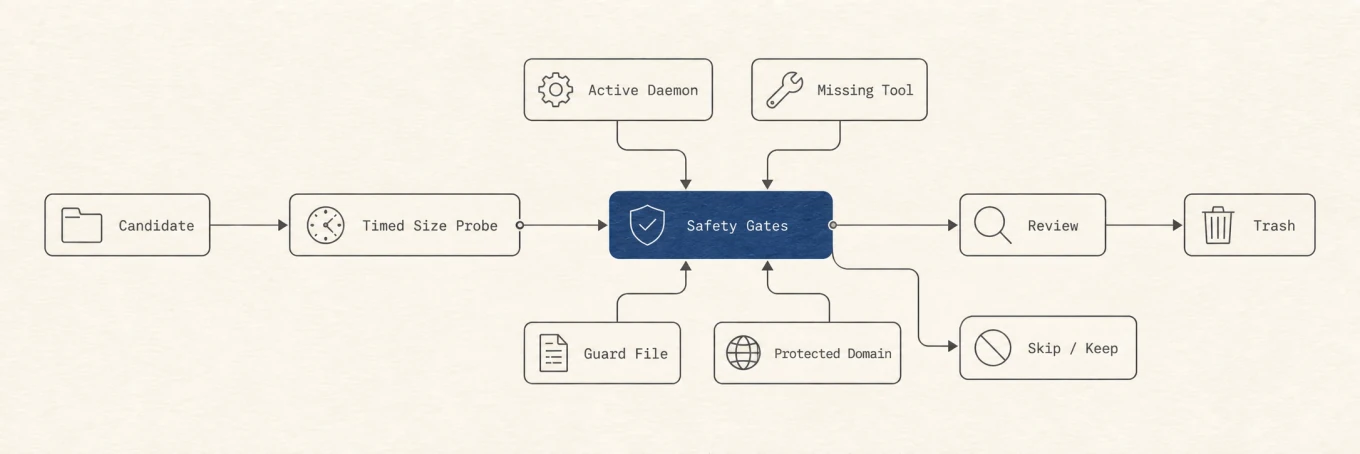
A candidate reaches the Trash only through review and confirmation. Tool state, explicit guard files, and protected domains decide whether it reaches review or stays untouched.
Safe cleanup is a sequence of gates. A known path can still be skipped because its
owner is active, the size probe failed, the cleanup command is missing, or protection
rules classify it as state. A recursive deletion of an entire Caches folder bypasses
all of those decisions.
## Why the cache and System Data can grow again
A cache that stays empty is often a cache the app no longer uses. Normal apps rebuild
thumbnails, download package archives, recompile derived output, and recreate search
indexes. The next launch can therefore use more CPU, energy, network traffic, and disk
space. Regrowth does not prove the cleanup failed; it proves the owner needed the data
again.
System Settings may also update later or continue assigning the rebuilt files to
System Data. Because System Data is a broad category rather than one folder, its graph
can lag behind actual file operations or stay large for unrelated reasons. Check the
Mac's available storage and the measured owner directory. Do not keep deleting new
categories to chase a delayed label.
The safe sequence stays short: measure, identify the owner, classify the contents,
ask the five recovery questions, use the owner's preview or cleanup control, and test
the app before any permanent removal. A cache is safe to clear only when the source
and the recovery path are both known.
---
Canonical HTML page: https://mole.fit/blog/how-to-clear-cache-on-mac
Blog index for agents: https://mole.fit/blog/llms.txt
Site index for agents: https://mole.fit/llms.txt